
Managing employees and payroll is one of the most sensitive processes in any business. Payroll errors lead to compliance risks, employee dissatisfaction, and financial discrepancies. Manual time tracking and disconnected HR systems only increase the complexity.
Odoo 19 HR and Payroll simplifies employee management by integrating payroll, attendance, leave, and contracts into a unified workflow.
In this guide, you’ll learn how to properly configure and use Odoo 19 HR to process payroll accurately and manage employees efficiently.
❖ What Is Odoo 19 HR and Payroll ?
Odoo 19 HR is a module designed to centralize the following :-
• Employee records
• Payroll processing
• Attendance tracking
• Leave management
• Benefits administration
• Compliance rules
Because it integrates with other Odoo modules like Accounting and Timesheets, payroll calculations are based on real-time data rather than manual entries.
❖ Step 1 : Set Up Pay Runs in Odoo 19 Payroll
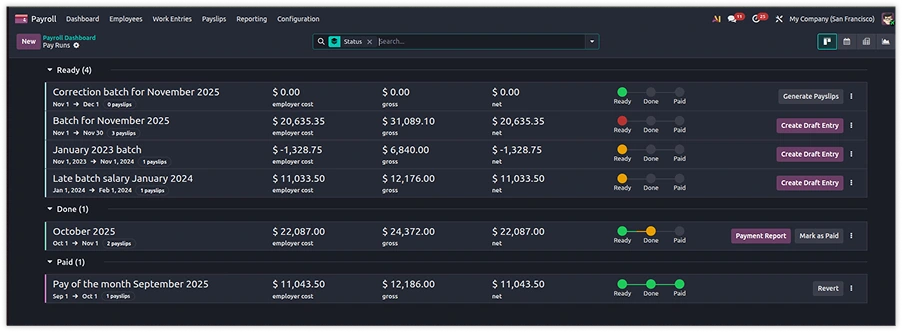
Odoo 19 replaces older payroll batch processes with Pay Runs, a structured workflow that guides payroll processing step-by-step.
How to Process Payroll in Odoo 19
1. Go to Payroll → Pay Runs
2. Click Create
3. Select the payroll period
4. Generate payslips automatically
5. Review calculations
6. Validate and confirm payments
Why Pay Runs Matter
Instead of switching between multiple screens :-
• All payslips are processed in one workflow
• Errors are easier to identify
• Corrections can be made before finalizing
This reduces payroll processing time and improves accuracy.
❖ Step 2 : Integrate Attendance with Payroll
Manual overtime calculations often cause payroll discrepancies.
In Odoo 19 HR, attendance records automatically feed into payroll.
How to Enable Attendance Integration
1. Install the Attendance module
2. Link employees to contracts
3. Define working schedules
4. Configure overtime rules
Recorded hours are automatically reflected in payslips, eliminating manual data entry.
❖ Step 3 : Configure Overtime Rules
Different companies apply overtime differently.
Odoo 19 allows you to define the following :-
• Daily overtime rules
• Weekly overtime thresholds
• Premium rates (e.g., 1.5x, 2x)
• Eligibility conditions
Where to Configure Overtime
1. Navigate to Payroll → Configuration
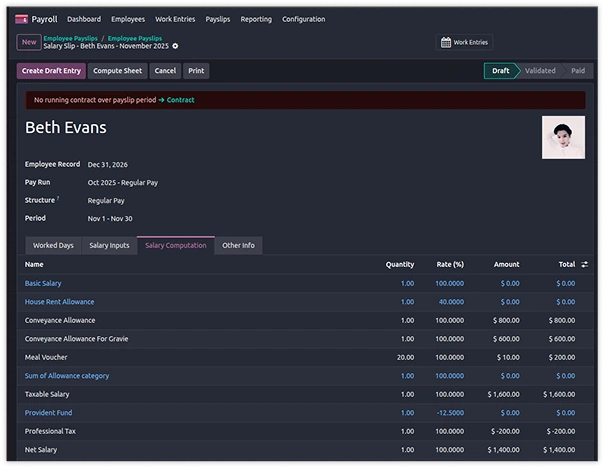
2. Define salary rules
3. Apply conditions and rate multipliers
The system automatically applies these rules during payslip generation.
❖ Step 4 : Manage Leave and Payroll Together
Leave approvals directly affect payroll.
Odoo 19 connects :-
• Sick leave
• Paid vacation
• Bereavement leave
• Custom leave types
How Leave Impacts Payroll
• Approved leave updates attendance
• Leave balances are automatically adjusted
• Salary deductions or adjustments are calculated
Unlike manual systems, there’s no need for separate HR-to-payroll handover.
❖ Step 5 : Manage Multiple Bank Accounts per Employee
Some employees prefer splitting salaries across accounts.
Odoo 19 supports :-
• Percentage-based splits
• Fixed-amount allocations
• Multiple bank accounts per employee
How to Configure Bank Splits
1. Open Employee Profile
2. Add multiple bank accounts
3. Define percentage or amount allocation
Payments are automatically divided during payroll processing.
❖ Step 6 : Handle Payroll Corrections Properly
Payroll errors happen. The key is correcting them without creating audit confusion.
Odoo 19 provides a structured correction process :-
1. Revert the payslip
2. Adjust salary rules or data
3. Regenerate the payslip
4. Validate again
An audit trail is maintained for compliance purposes.
❖ Step 7 : Configure Employee Benefits
Not all employees receive the same benefits.
Odoo 19 allows rule-based benefit eligibility based on :-
• Department
• Job role
• Contract type (Full-time / Part-time)
• Seniority
Benefits are automatically reflected in payroll calculations.
❖ Step 8 : Ensure Compliance with Local Payroll Rules
For businesses operating in multiple countries, compliance is critical.
Odoo 19 includes localized payroll support for regions such as :-
• India (EPF, ESIC)
• UAE (WPS)
• Luxembourg
• Other supported countries
You can configure country-specific salary rules to meet legal requirements.
❖ Step 9 : Use Employee Self-Service to Reduce HR Workload
Odoo 19 HR allows employees to :-
• Download payslips
• Apply for leave
• View leave balances
• Update personal information
This reduces administrative overhead and improves transparency.
❖ Step 10 : Use Payroll Reporting for Better Financial Control
• Total payroll expenses
• Department cost breakdown
• Overtime spending
• Budget vs actual comparisons• Year-to-date salary analysis
Regular reporting helps identify inefficiencies and optimize workforce planning.
❖ Common Mistakes When Implementing Odoo 19 HR & Payroll
Avoid these common errors :-
❌ Not defining overtime rules clearly
❌ Failing to integrate attendance before payroll
❌ Skipping proper leave configuration
❌ Ignoring benefit eligibility rules
❌ Running payroll without reviewing salary structures
Proper configuration at the start prevents costly corrections later.
❖ Is Odoo 19 HR Right for Your Business ?
Odoo 19 HR and Payroll works best for :-
• Multi-department organizations
• Companies operating across countries
• Businesses needing automated compliance
• Firms wanting integrated attendance and payrollIt reduces manual intervention and centralizes all employee data in one system.
❖ Conclusion
Odoo 19 HR and Payroll simplifies :-
• Payroll processing with Pay Runs
• Attendance and overtime integration
• Leave and benefits automation
• Compliance management• Employee self-service
When properly configured, Odoo 19 reduces payroll errors and administrative workload while improving transparency.
If you’re planning to implement Odoo 19 HR, start with clear pay structures, attendance rules, and benefit policies to ensure smooth payroll operations