- All products
- ERP Dashboard Bits
- All products



Management Dashboard
The Management Dashboard module provides an overview of employee
activities within Odoo. It is designed to help managers and HR teams
monitor workforce attendance, employee presence, running tasks,
timesheets, and leave schedules in real time.

Smart operations
All information displayed in the dashboard is automatically
fetched from standard Odoo modules, such as:-

Attendence

Employees
Timesheets

Projects
Tasks

Time Off

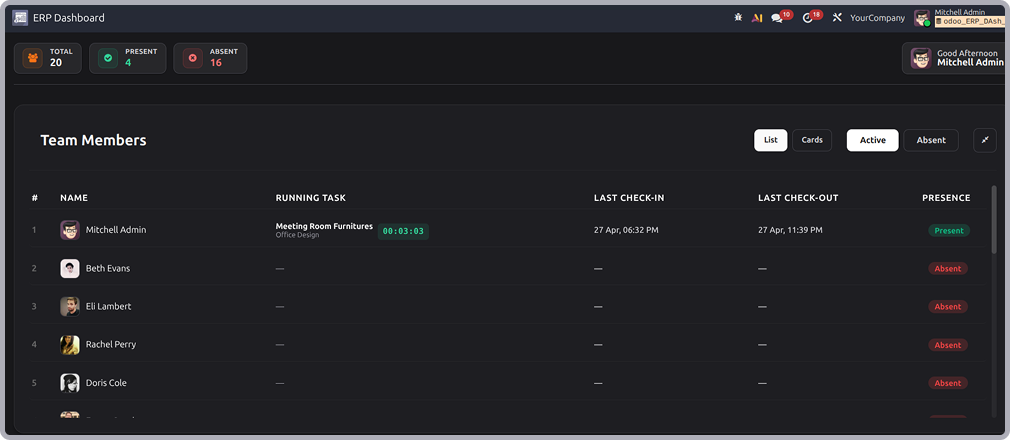
Team members list view
- This screen shows the main team members dashboard in list view.
-
It provides a quick overview of employee attendance statistics, including total employees, present
employees, and absent employees. - The table displays employee details such as running tasks, last check-in/check-out times.
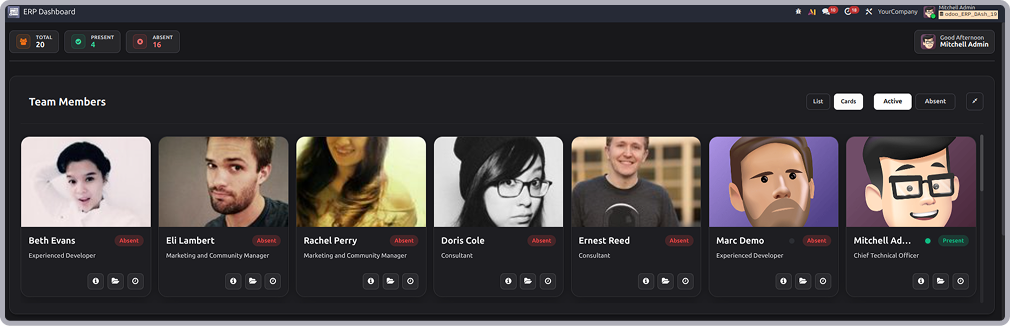
Team members card view
- This screen displays the team members dashboard in card view.
- Each employee card contains the employee's photo, name, designation, and attendance status.
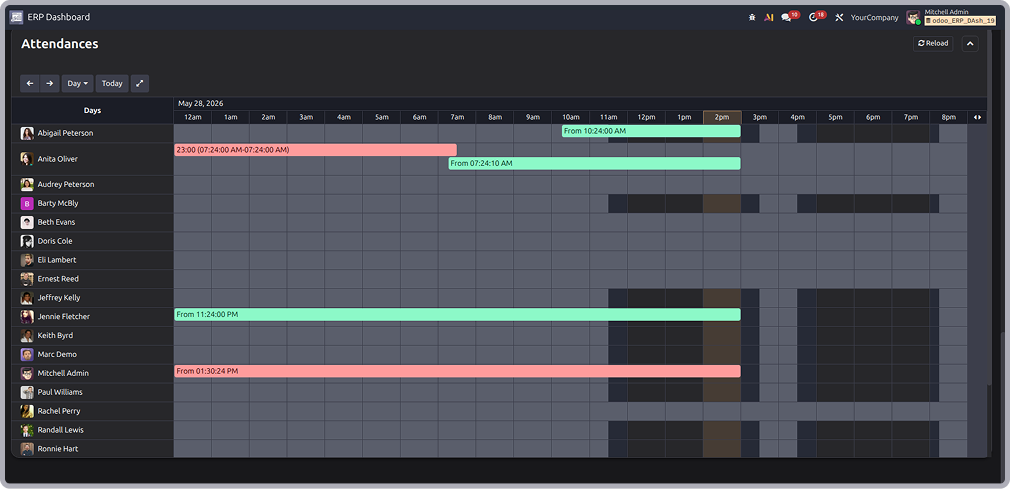
Attendance timeline view
-
This screen shows the attendance timeline view, where employee attendance records are displayed
across a time-based schedule. - It helps users monitor employee check-in and check-out activities of the day.
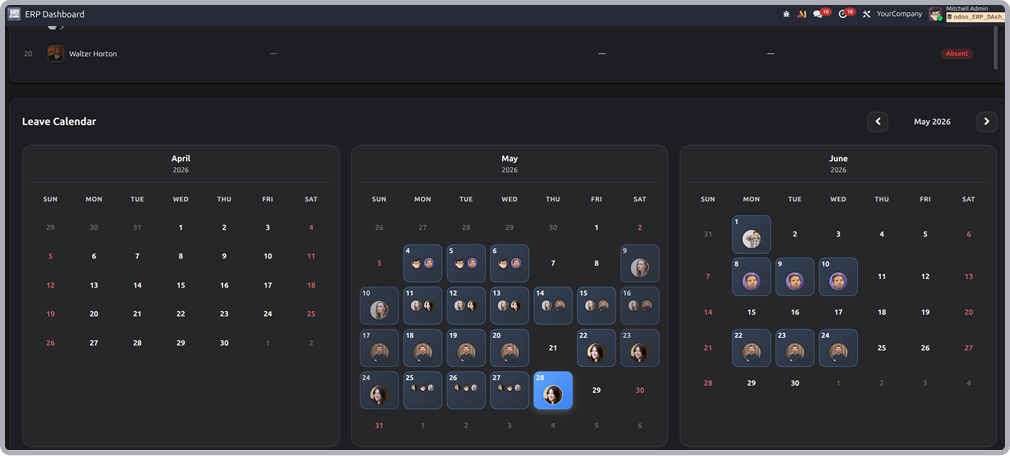
Leave calendar view
- This screen displays the leave calendar, which provides a monthly overview of employee leave schedules.
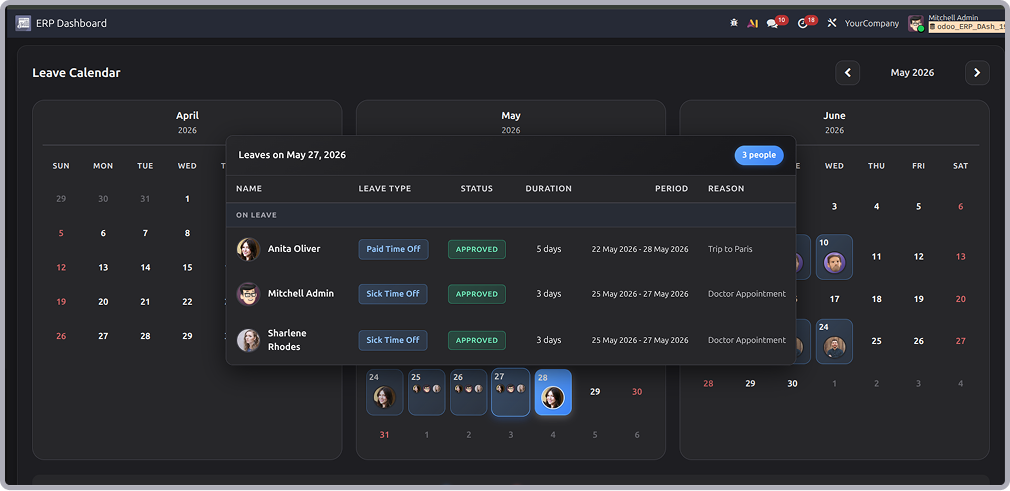
Leave details popup view
- This screen shows the Leave Details pop-up window that appears when selecting a leave entry from the calendar.
-
It displays detailed information such as employee name, leave type, approval status, duration, leave period,
and leave reason.

Need Help ?
You can instantly find the answer you need here when
you're looking for a quick solution.

The management dashboard provides a centralized view of employee attendance, running tasks, presence status, and leave information in one place.
The dashboard fetches data from standard Odoo modules such as Attendance, Employees, Timesheets, Projects, Tasks, and Time Off.
Yes, the dashboard updates employee attendance, running tasks, and presence information based on live records available in odoo.
Yes, users can only view information based on the access rights and permissions assigned to them in Odoo.
Yes, I do provide free support for 90 days for any queries or any bug/issue fixing.
In case of if any bug raised in the listed features of this module, I am committed to providing support free of cost. You will need to provide me server ssh access or database access in order to solve the issue.
Changelog(s)
Each update brings improvements to make the
app work better for you.

Recommended Apps
Need any help for this module?
Contact us info@terabits.xyz for your queries


Management Dashboard
The Management Dashboard module provides an overview of employee
activities within Odoo. It is designed to help managers and HR teams
monitor workforce attendance, employee presence, running tasks,
timesheets, and leave schedules in real time.

Smart operations
All information displayed in the dashboard is automatically
fetched from standard Odoo modules, such as:-

Attendence

Employees
Timesheets

Projects
Tasks

Time Off

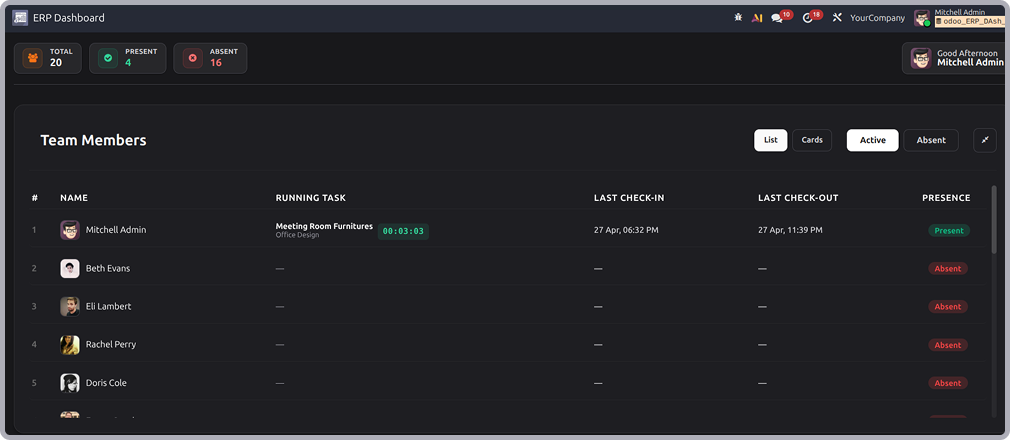
Team members list view
- This screen shows the main team members dashboard in list view.
-
It provides a quick overview of employee attendance statistics, including total employees, present
employees, and absent employees. - The table displays employee details such as running tasks, last check-in/check-out times.
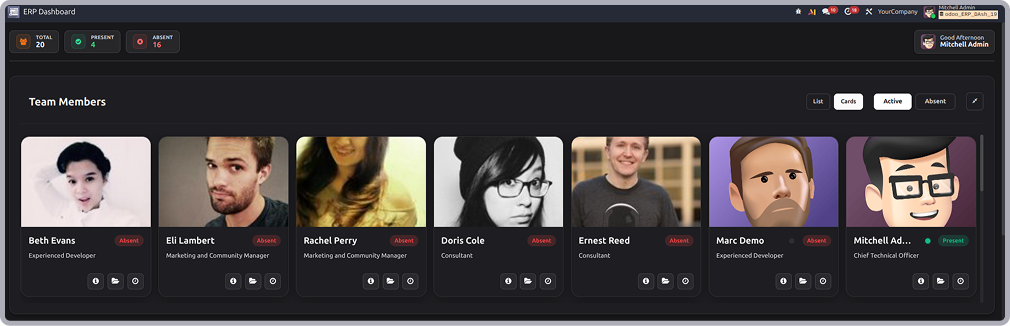
Team members card view
- This screen displays the team members dashboard in card view.
- Each employee card contains the employee's photo, name, designation, and attendance status.
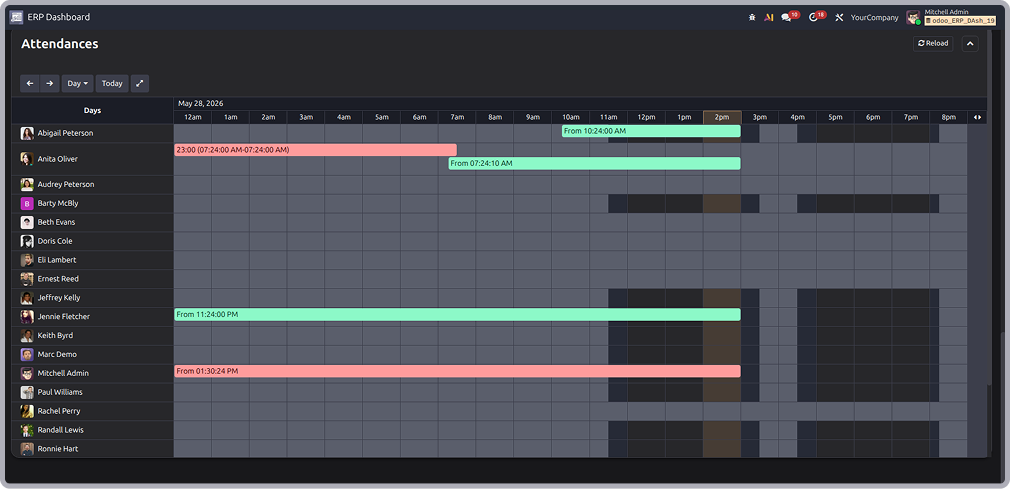
Attendance timeline view
-
This screen shows the attendance timeline view, where employee attendance records are displayed
across a time-based schedule. - It helps users monitor employee check-in and check-out activities of the day.
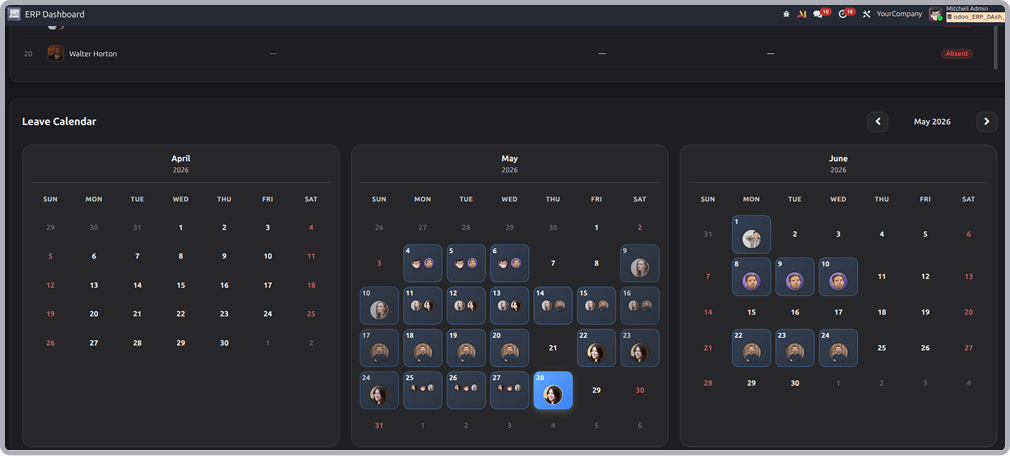
Leave calendar view
- This screen displays the leave calendar, which provides a monthly overview of employee leave schedules.
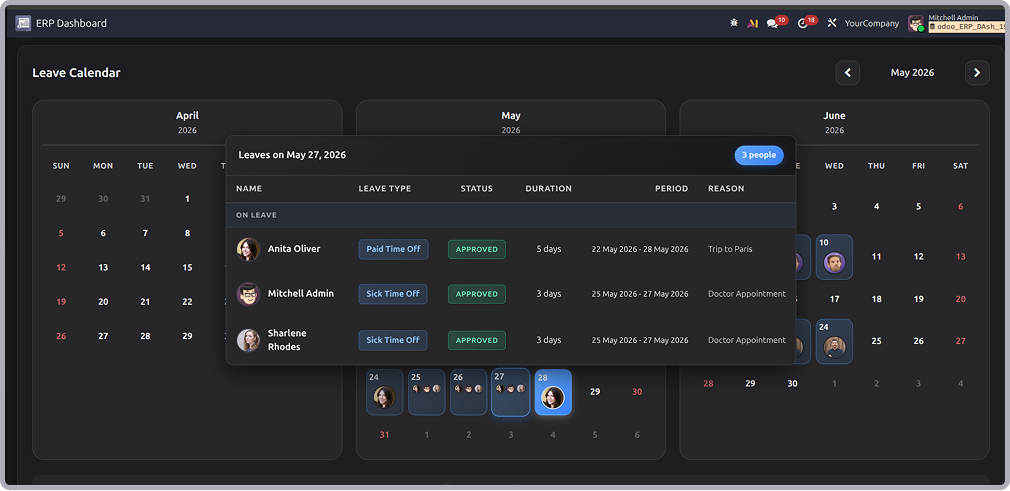
Leave details popup view
- This screen shows the Leave Details pop-up window that appears when selecting a leave entry from the calendar.
-
It displays detailed information such as employee name, leave type, approval status, duration, leave period,
and leave reason.

Need Help ?
You can instantly find the answer you need here when
you're looking for a quick solution.

The management dashboard provides a centralized view of employee attendance, running tasks, presence status, and leave information in one place.
The dashboard fetches data from standard Odoo modules such as Attendance, Employees, Timesheets, Projects, Tasks, and Time Off.
Yes, the dashboard updates employee attendance, running tasks, and presence information based on live records available in odoo.
Yes, users can only view information based on the access rights and permissions assigned to them in Odoo.
Yes, I do provide free support for 90 days for any queries or any bug/issue fixing.
In case of if any bug raised in the listed features of this module, I am committed to providing support free of cost. You will need to provide me server ssh access or database access in order to solve the issue.
Changelog(s)
Each update brings improvements to make the
app work better for you.

Recommended Apps
Need any help for this module?
Contact us info@terabits.xyz for your queries


Management Dashboard
The Management Dashboard module provides an overview of employee
activities within Odoo. It is designed to help managers and HR teams
monitor workforce attendance, employee presence, running tasks,
timesheets, and leave schedules in real time.

Smart operations
All information displayed in the dashboard is automatically
fetched from standard Odoo modules, such as:-

Attendence

Employees
Timesheets

Projects
Tasks

Time Off

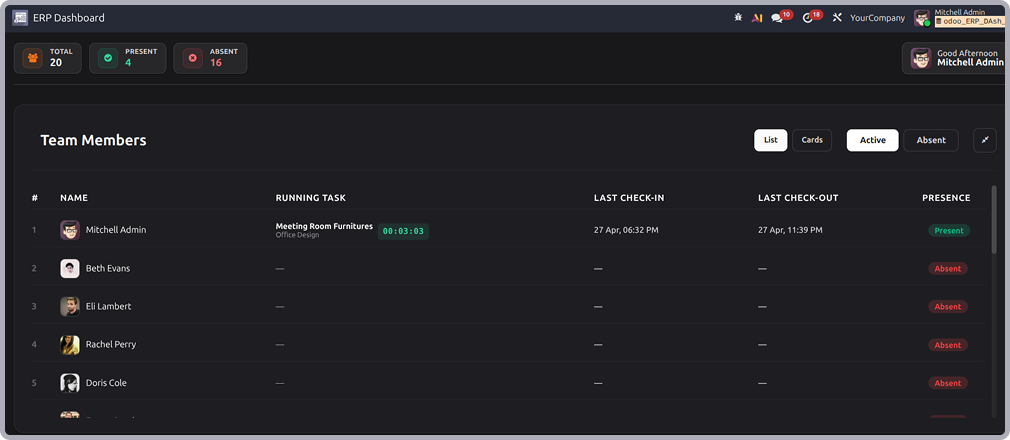
Team members list view
- This screen shows the main team members dashboard in list view.
-
It provides a quick overview of employee attendance statistics, including total employees, present
employees, and absent employees. - The table displays employee details such as running tasks, last check-in/check-out times.
Team members card view
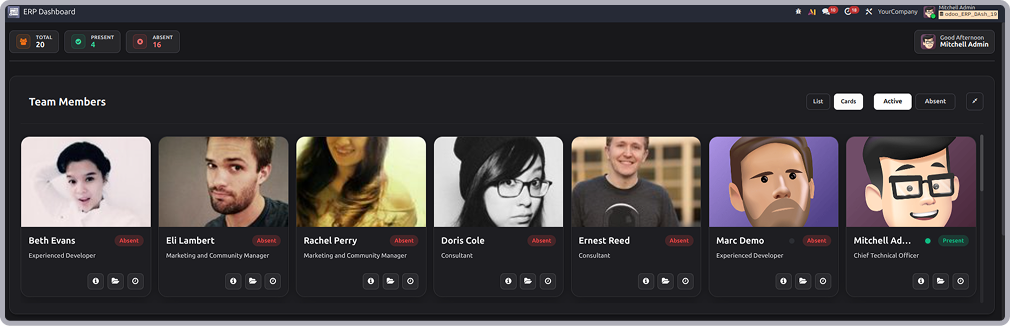
- This screen displays the team members dashboard in card view.
- Each employee card contains the employee's photo, name, designation, and attendance status.
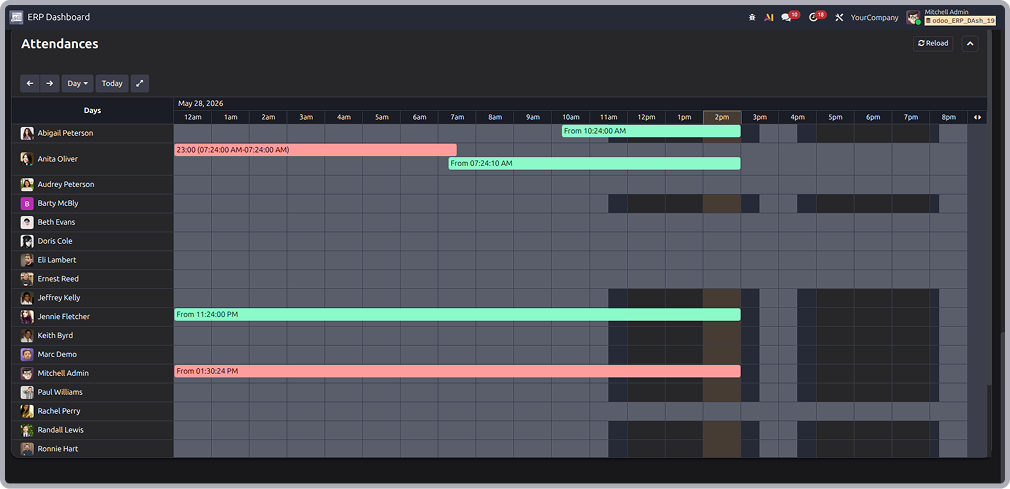
Attendance timeline view
-
This screen shows the attendance timeline view, where employee attendance records are displayed
across a time-based schedule. - It helps users monitor employee check-in and check-out activities of the day.
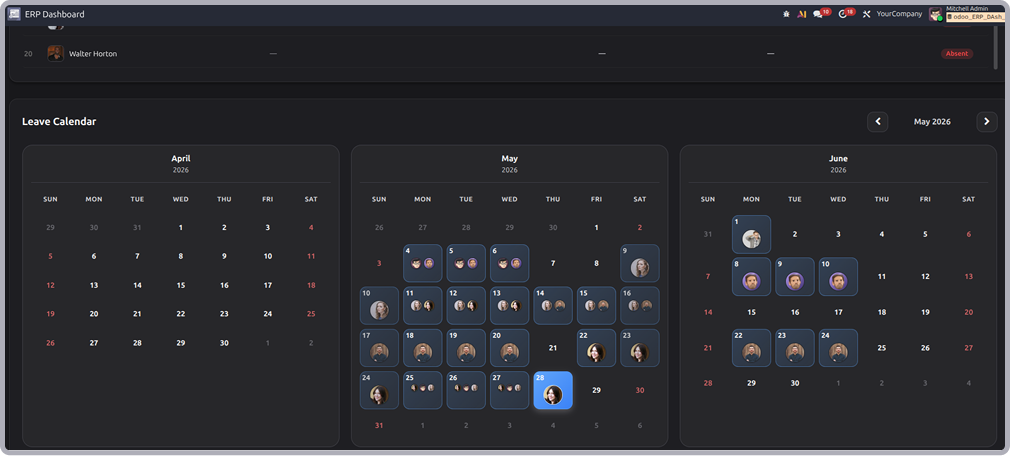
Leave calendar view
- This screen displays the leave calendar, which provides a monthly overview of employee leave schedules.
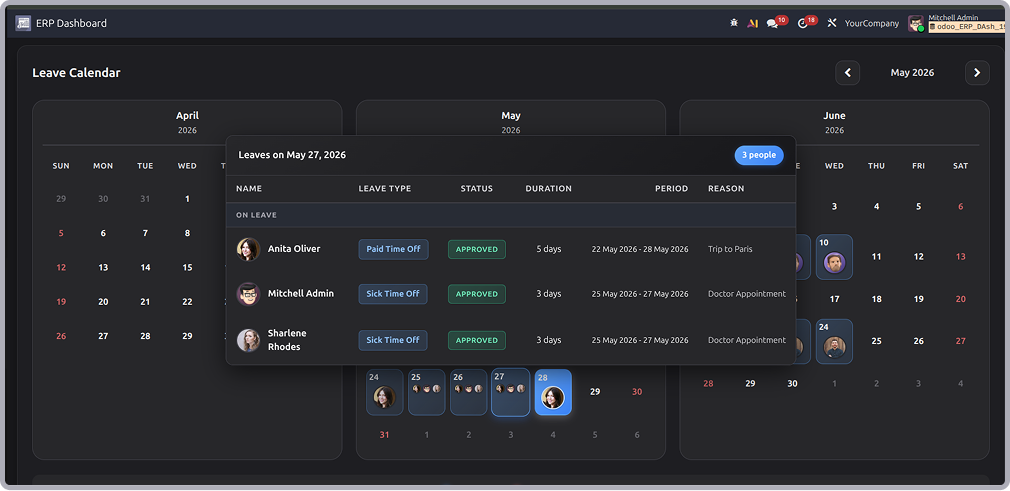
Leave details popup view
- This screen shows the Leave Details pop-up window that appears when selecting a leave entry from the calendar.
-
It displays detailed information such as employee name, leave type, approval status, duration, leave period,
and leave reason.

Need Help ?
You can instantly find the answer you need here when
you're looking for a quick solution.

The management dashboard provides a centralized view of employee attendance, running tasks, presence status, and leave information in one place.
The dashboard fetches data from standard Odoo modules such as Attendance, Employees, Timesheets, Projects, Tasks, and Time Off.
Yes, the dashboard updates employee attendance, running tasks, and presence information based on live records available in odoo.
Yes, users can only view information based on the access rights and permissions assigned to them in Odoo.
Yes, I do provide free support for 90 days for any queries or any bug/issue fixing.
In case of if any bug raised in the listed features of this module, I am committed to providing support free of cost. You will need to provide me server ssh access or database access in order to solve the issue.
Changelog(s)
Each update brings improvements to make the
app work better for you.

Recommended Apps
Need any help for this module?
Contact us info@terabits.xyz for your queries


Management Dashboard
The Management Dashboard module provides an overview of employee
activities within Odoo. It is designed to help managers and HR teams
monitor workforce attendance, employee presence, running tasks,
timesheets, and leave schedules in real time.

Smart operations
All information displayed in the dashboard is automatically
fetched from standard Odoo modules, such as:-

Attendence

Employees
Timesheets

Projects
Tasks

Time Off

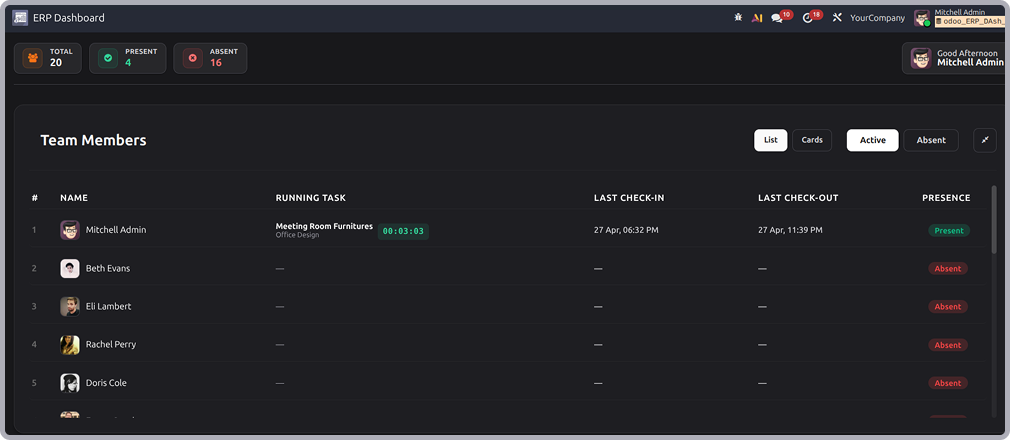
Team members list view
- This screen shows the main team members dashboard in list view.
-
It provides a quick overview of employee attendance statistics, including total employees, present
employees, and absent employees. - The table displays employee details such as running tasks, last check-in/check-out times.
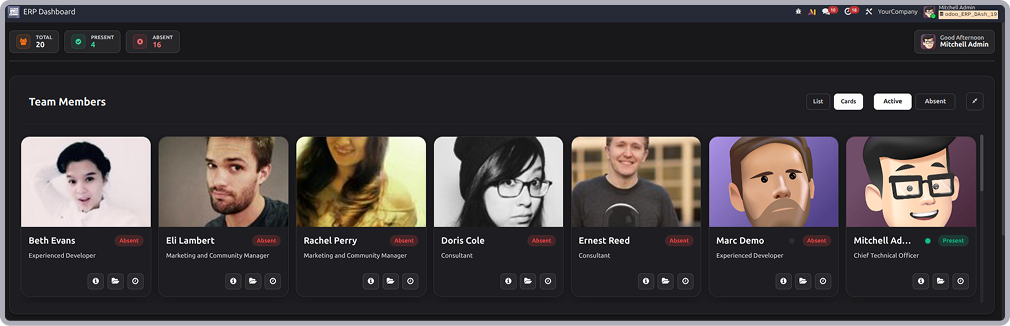
Team members card view
- This screen displays the team members dashboard in card view.
- Each employee card contains the employee's photo, name, designation, and attendance status.
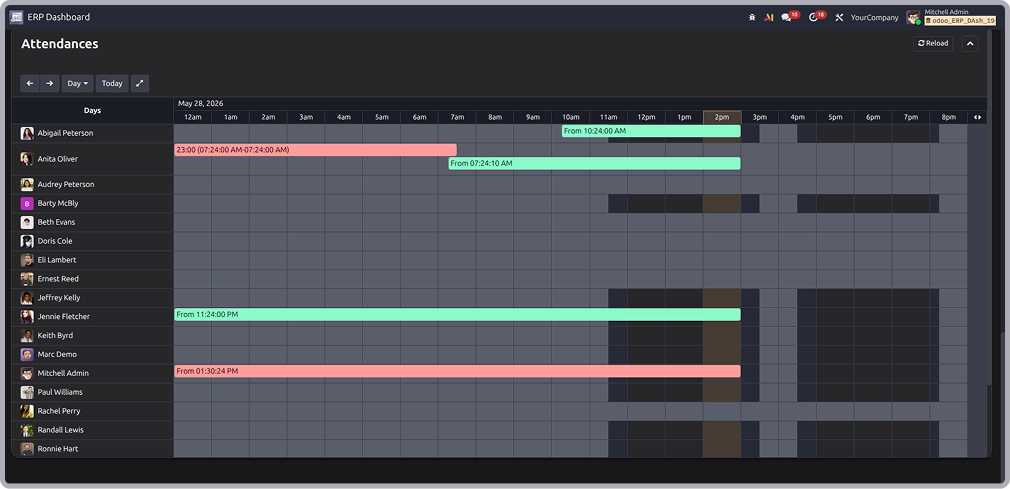
Attendance timeline view
-
This screen shows the attendance timeline view, where employee attendance records are displayed
across a time-based schedule. - It helps users monitor employee check-in and check-out activities of the day.
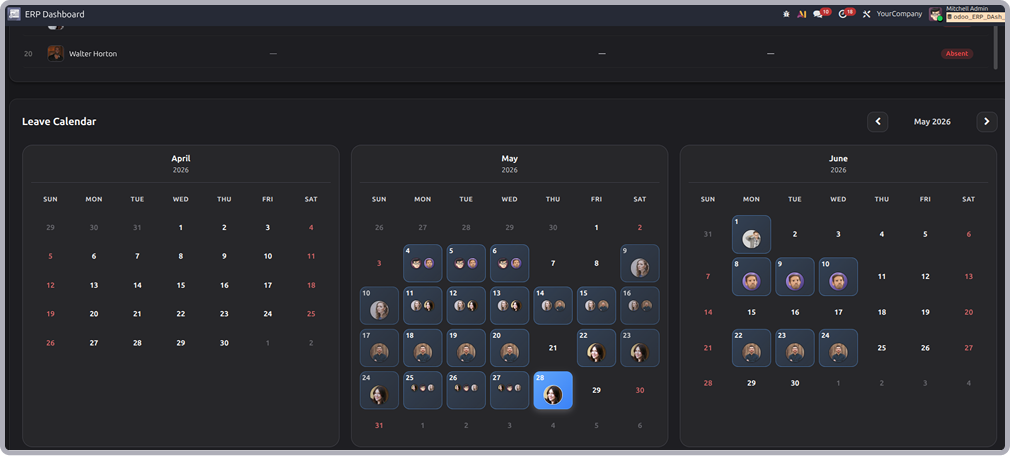
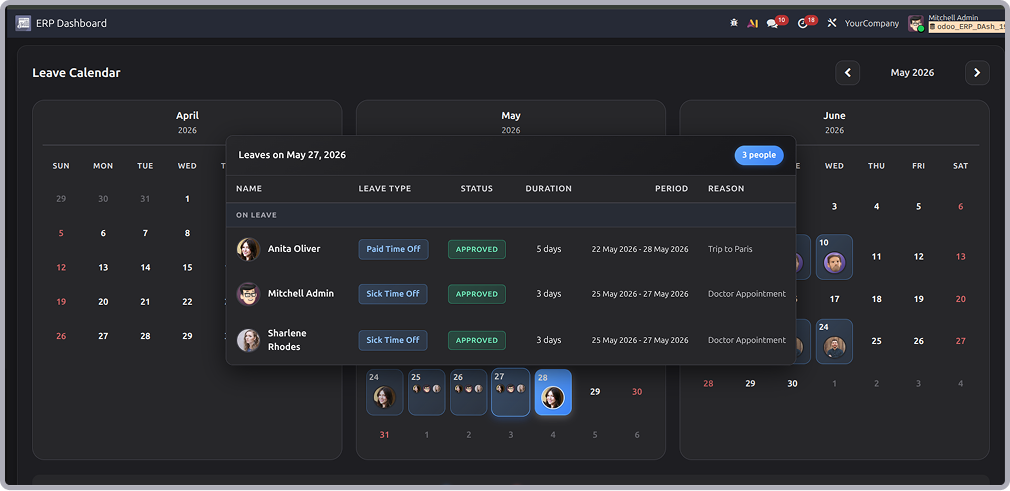
Leave calendar view
- This screen displays the leave calendar, which provides a monthly overview of employee leave schedules.
Leave details popup view
- This screen shows the Leave Details pop-up window that appears when selecting a leave entry from the calendar.
-
It displays detailed information such as employee name, leave type, approval status, duration, leave period,
and leave reason.

Need Help ?
You can instantly find the answer you need here when
you're looking for a quick solution.

The management dashboard provides a centralized view of employee attendance, running tasks, presence status, and leave information in one place.
The dashboard fetches data from standard Odoo modules such as Attendance, Employees, Timesheets, Projects, Tasks, and Time Off.
Yes, the dashboard updates employee attendance, running tasks, and presence information based on live records available in odoo.
Yes, users can only view information based on the access rights and permissions assigned to them in Odoo.
Yes, I do provide free support for 90 days for any queries or any bug/issue fixing.
In case of if any bug raised in the listed features of this module, I am committed to providing support free of cost. You will need to provide me server ssh access or database access in order to solve the issue.
Changelog(s)
Each update brings improvements to make the
app work better for you.

Recommended Apps