- All products
- AI Affiliate Management
- All products



Advance Affiliate Manager with AI
An AI writer for your affiliates. They get ready-to-post captions, emails and
WhatsApp messages in one click. You get AI reports on your program. Works
with OpenAI, Gemini, Claude and OpenRouter.


What This App Does

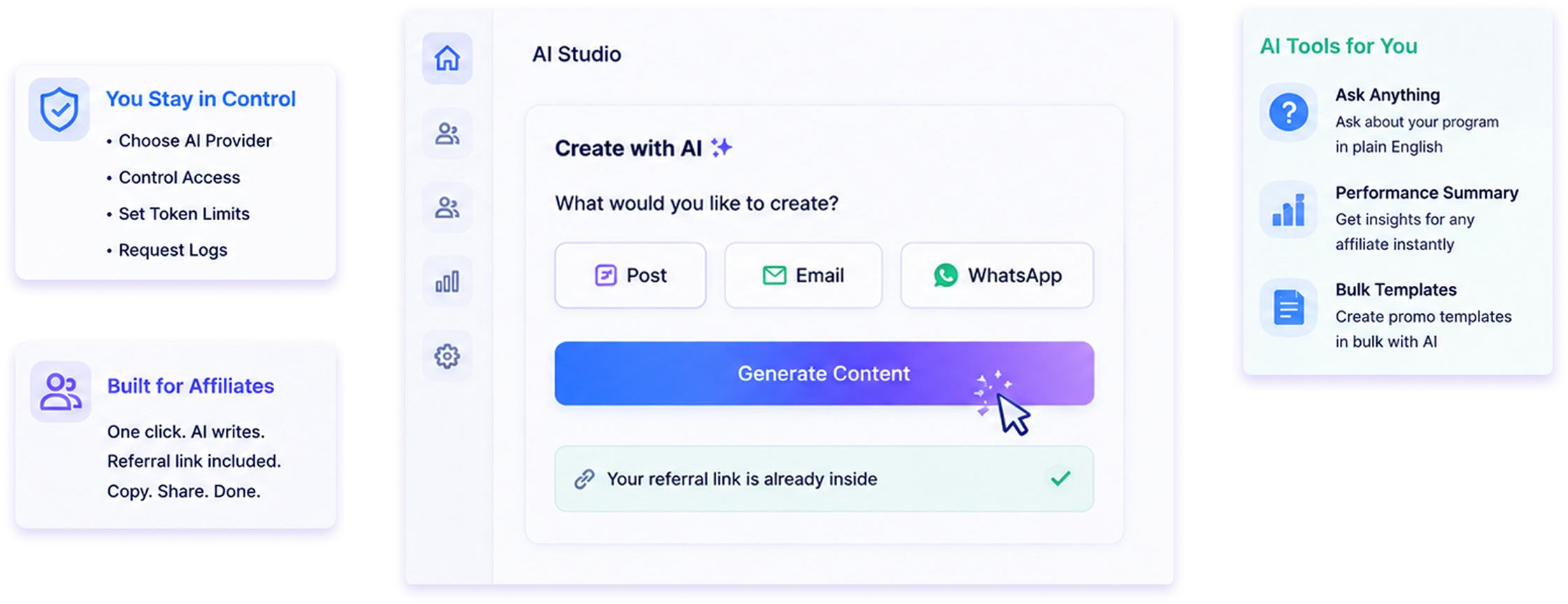
Most affiliates stop promoting because writing is hard. This app writes for them.
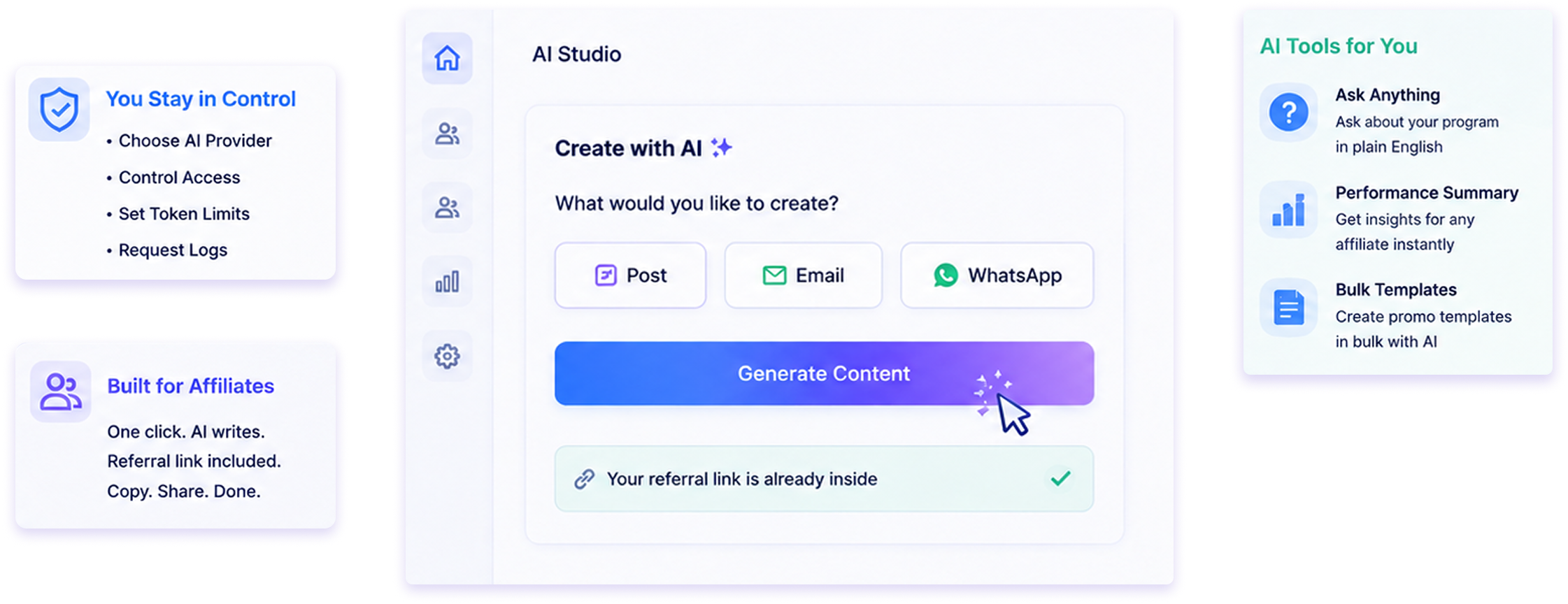
It adds AI to your existing Affiliate Management module. Your affiliates open their portal and click one
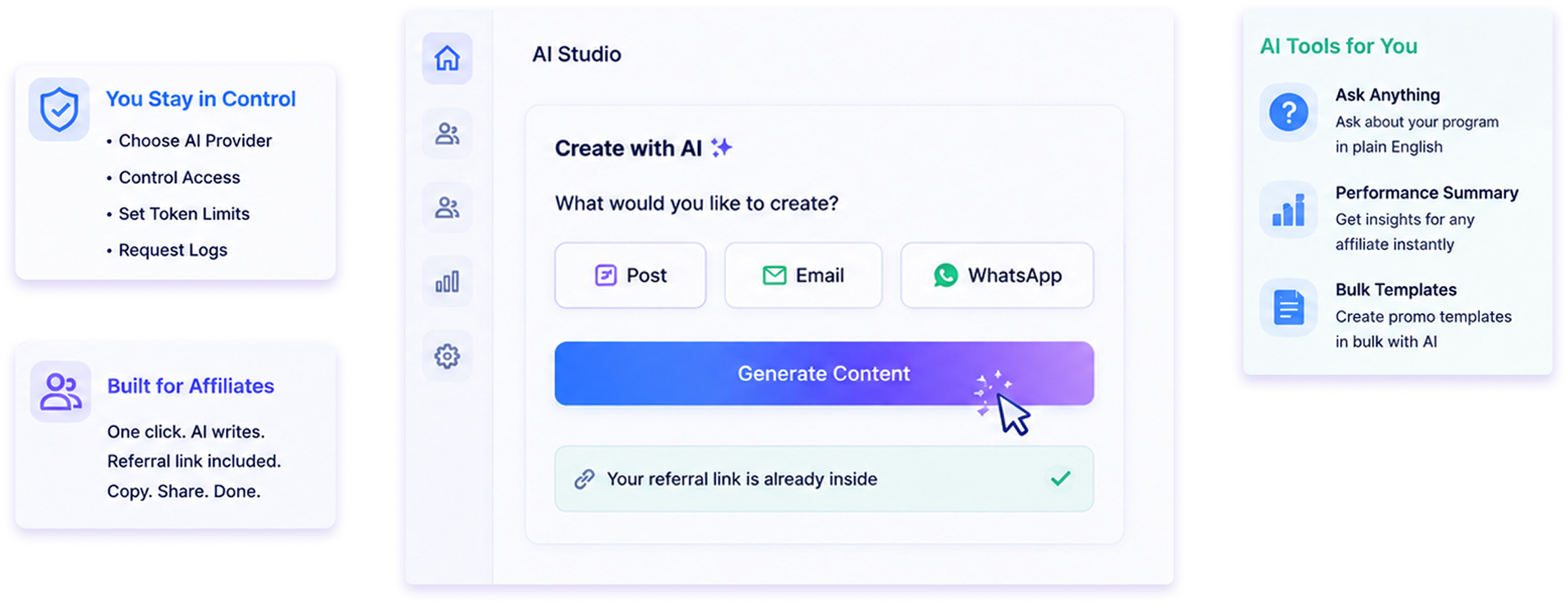
button. The AI writes a post, an email or a whatsApp message. Their referral link is already inside.
They copy it and share it.
You stay in control. You choose the AI provider. You decide who can use it. You set how many tokens
each affiliate gets. Every request is saved in a log.
You also get AI tools for yourself. Ask questions about your program in plain English. Get a performance
summary for any affiliate. Create promo templates in bulk.


Key Highlights

Affiliates write posts in seconds, not hours.
Content is based on your real products, not generic
text.
Works with OpenAI, Google Gemini, Anthropic Claude,
OpenRouter or your own AI server.
Token limits stop surprise bills.
Admin AI tools are free. They never use affiliate
tokens.

The referral link is added automatically. No copy-paste
mistakes.
The AI answers questions using each affiliate's own
numbers.
You approve each affiliate one by one. Nobody
gets access by default.
Every AI request is logged with its token cost.
No coding needed. Everything is set from the
Settings page.

Writes content
Captions, emails, WhatsApp
messages, blog text and hashtags.

Answers questions
Affiliates ask. The AI replies using
their real data.

You control it
Master switch, per-affiliate
approval and token limits.

Reports for you
Program analysis and per-affiliate
summaries.


All Features

AI studio
A new AI panel on the affiliate's Promo Content page. It has four tabs.
- Generate - write new content.
- Improve - make their own text better.
- Translate - change the language.
- Ask AI - ask a question.
A badge at the top shows tokens left and tokens used. It updates after each request. If the affiliate has unlimited
use, it just says "Unlimited".

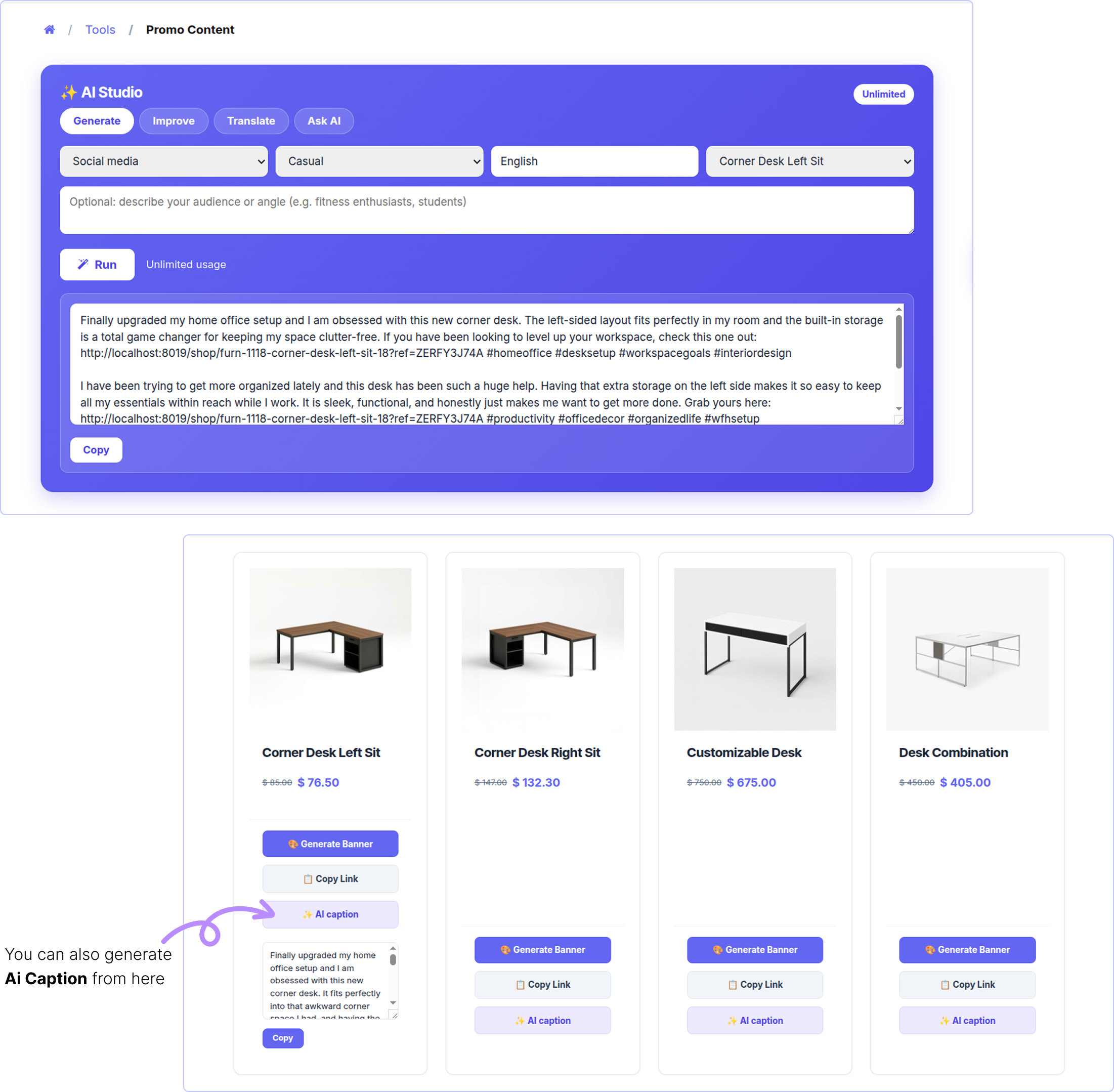
Generate content
The affiliate picks a few options and clicks Run. The AI writes three different versions.
- Channel - Social media · WhatsApp / SMS · Email · Blog / review
- Tone - Casual / Professional / Funny / Urgent (FOMO)
- Language - Any language. English by default.
- Product - One of your products, or a generic store link.
- Brief - Optional. Example: "for students" or "for gym users".
A badge at the top shows tokens left and tokens used. It updates after each request. If the affiliate has unlimited
use, it just says "Unlimited".

If a product is picked, the link goes to that product page with the affiliate's ref code.
If no product is picked, the link goes to the affiliate landing page with the ref code.
The text is plain. No stars, no markdown. It pastes cleanly into Instagram or WhatsApp.
Each result has a copy button.

Improve text
The affiliate pastes their own draft. The AI makes it shorter, clearer and more convincing.
They can also add an instruction like "make it shorter" or "make it more urgent". Links and hashtags are kept as they are.

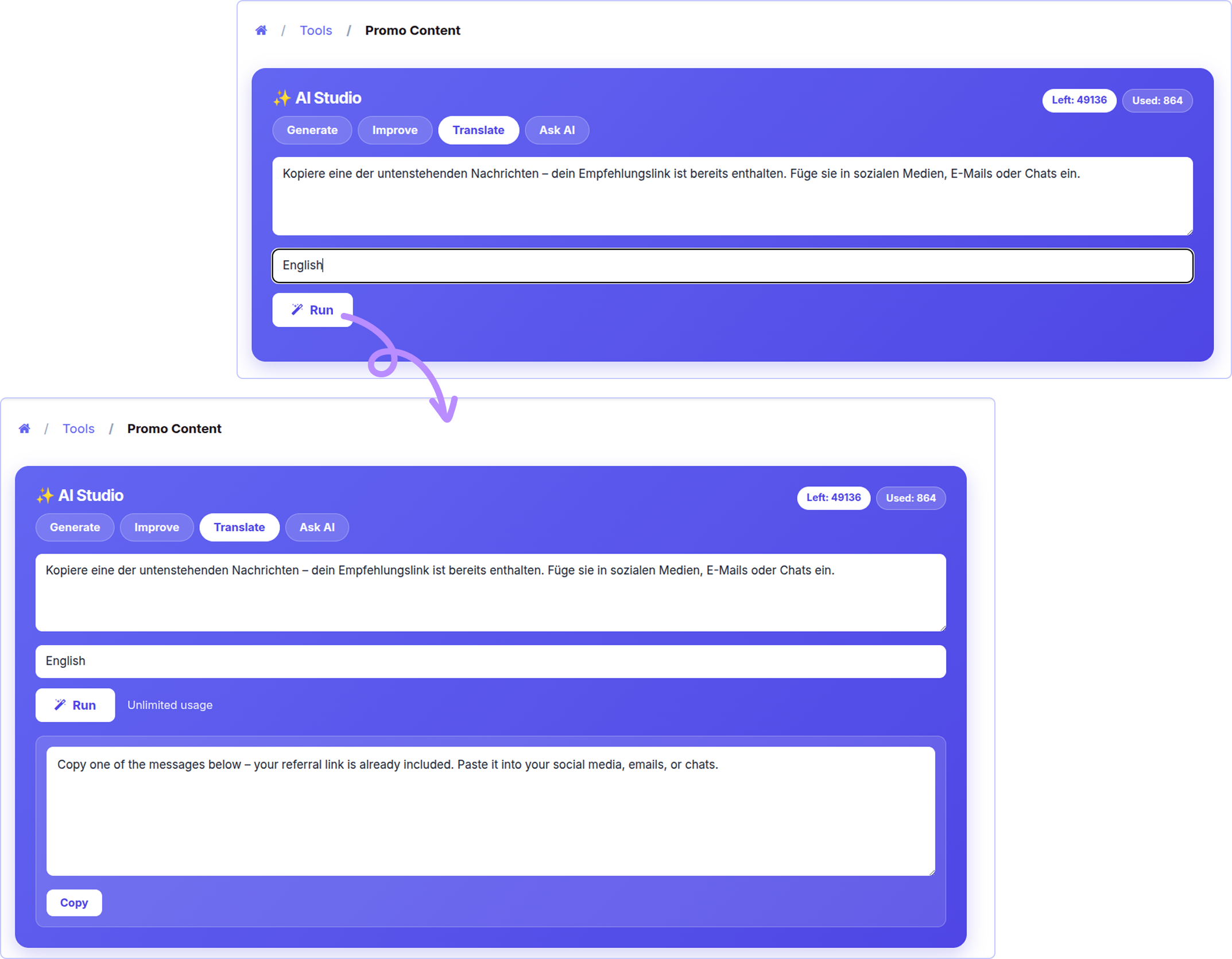
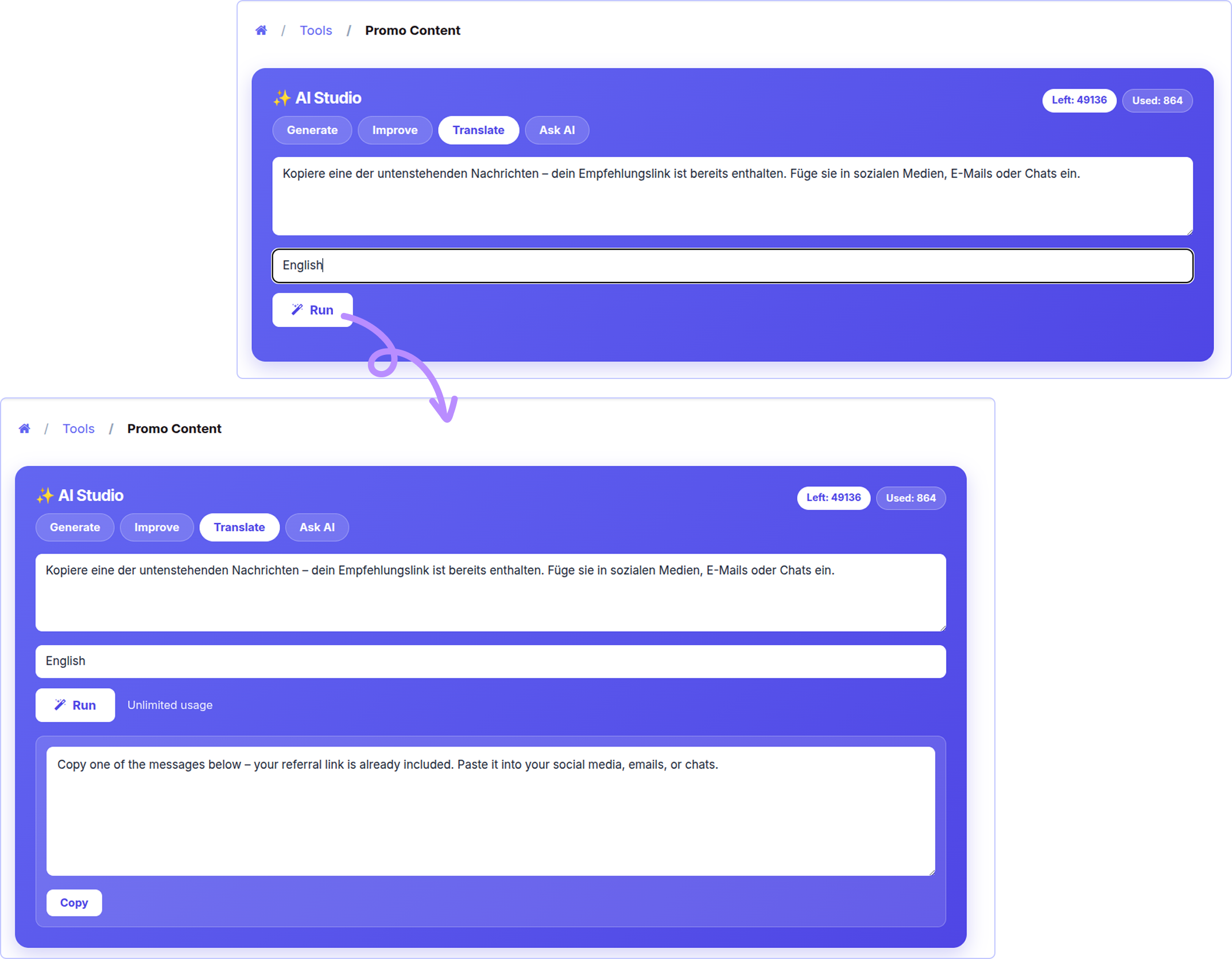
Translate Text
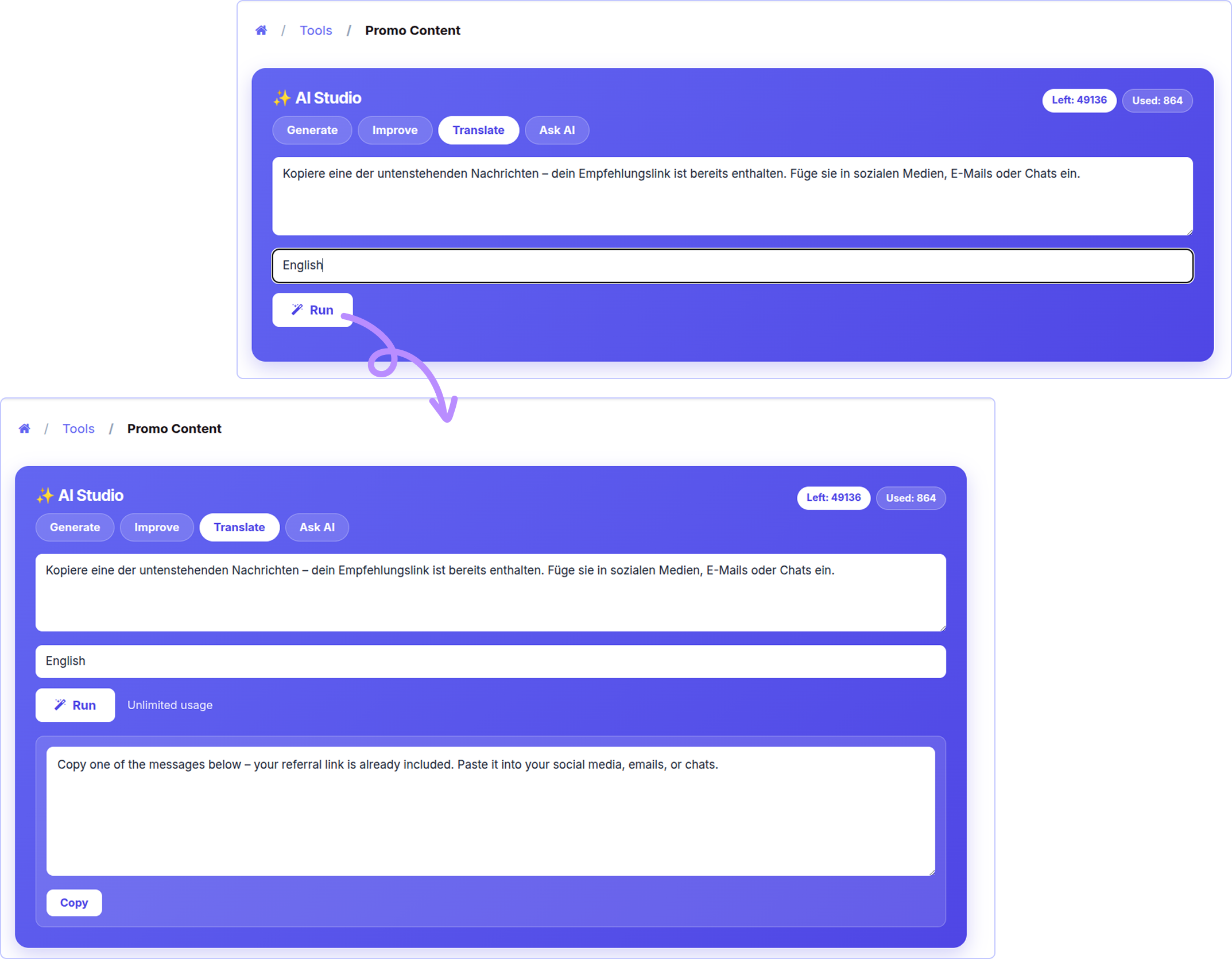
The affiliate pastes text and types a language. The AI translates it.
It is not a word-by-word translation. The AI keeps the marketing tone natural. Links, hashtags and emojis stay the same.

Ask AI
The affiliate types any question. The AI answers using their real numbers.
It knows their commission plan, tier, earnings, top products, last sale and payout rules. So the answer is about
them, not general advice.
If the answer is not in the data, the AI says so. It does not make things up.

AI coach on the dashboard
A small "Ask AI Coach" box is added to the affiliate dashboard. It sits right under the welcome message.
The affiliate types a question and clicks Ask. The answer appears below. The tokens left are shown too.
Common questions :
- "What is my commission rate?"
- "How do I reach the next tier?"
- "Which product should I promote?"
- "When do I get paid?"


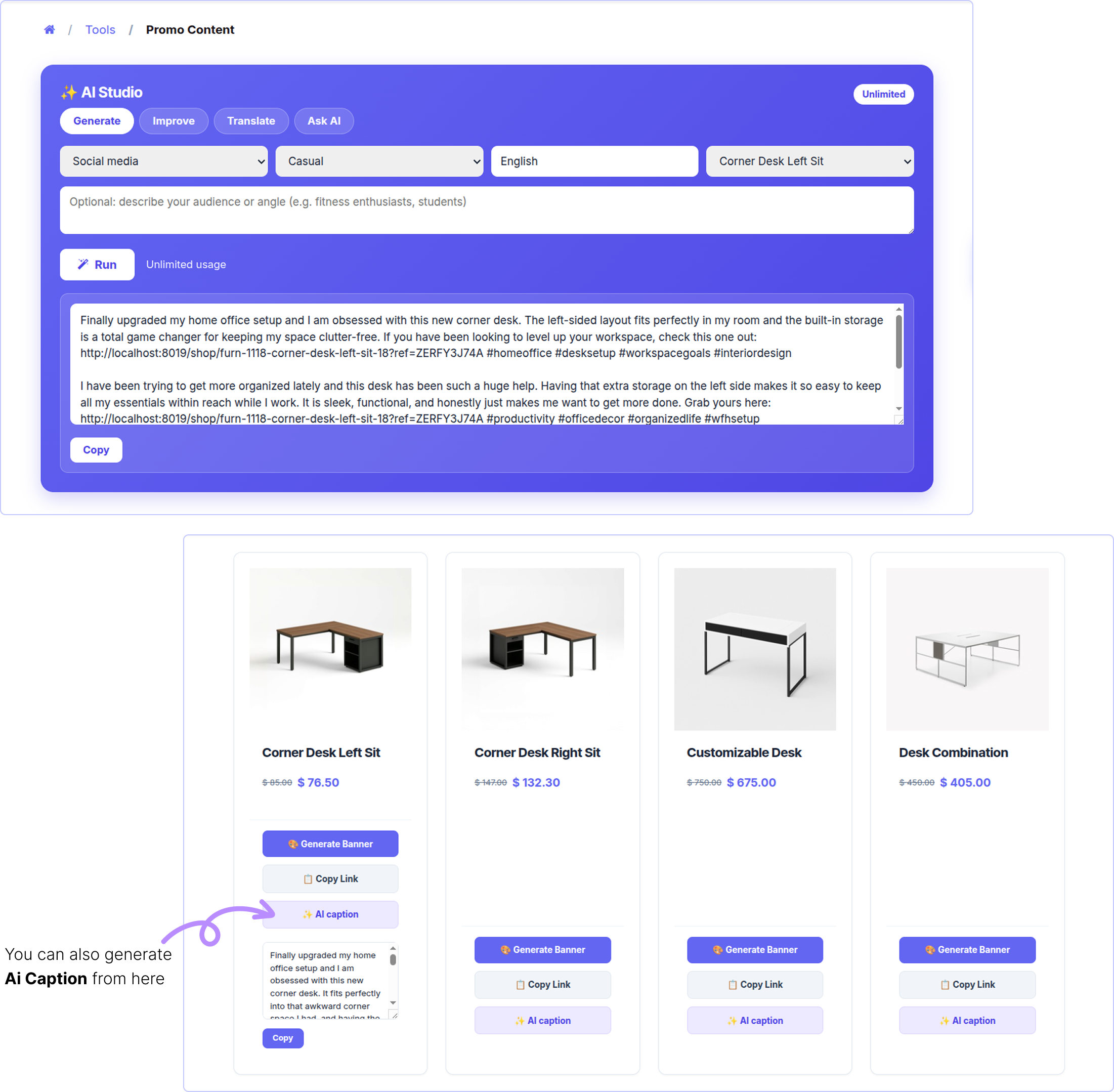
One-click AI caption
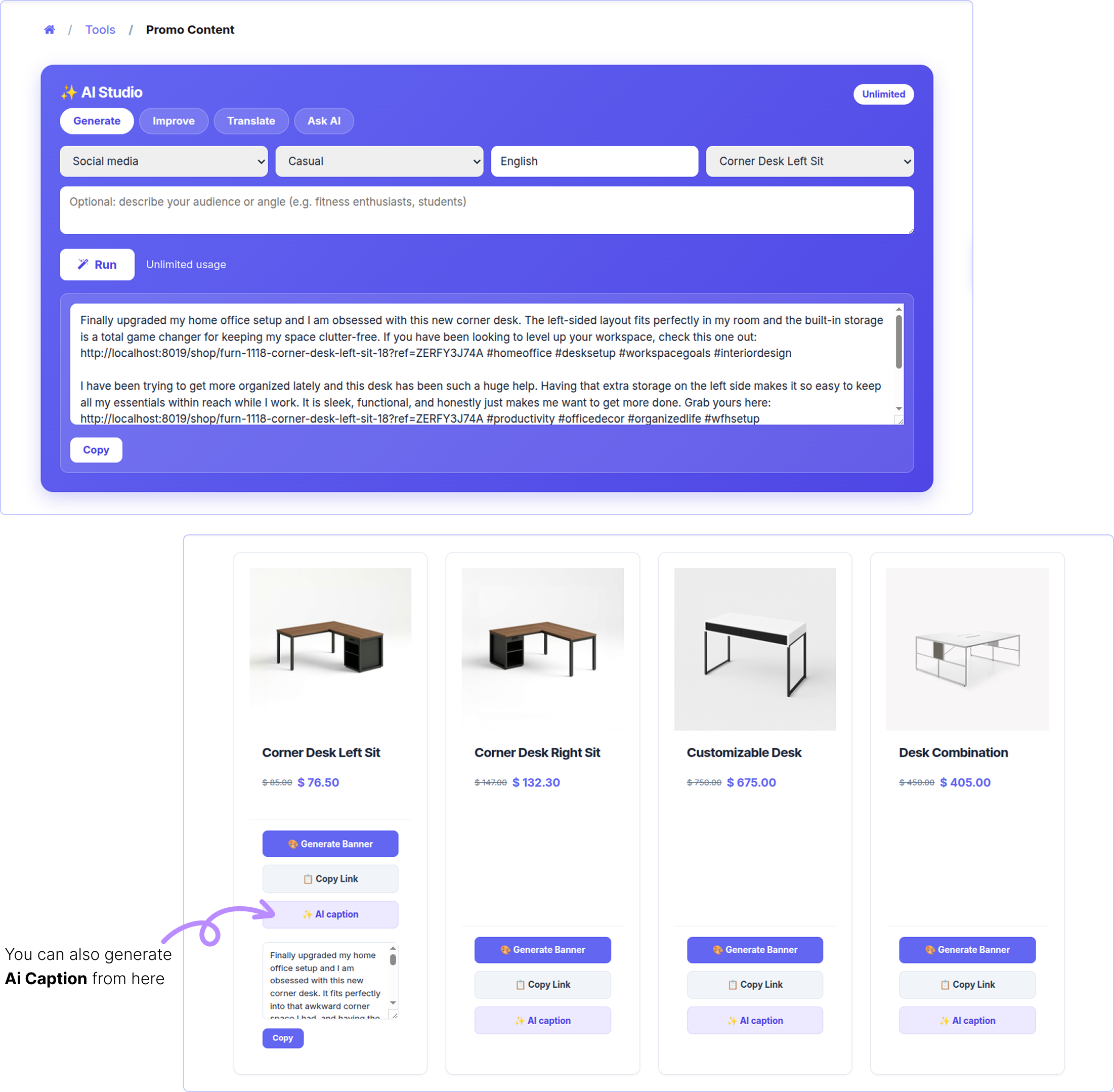
On the product link page, every product gets an AI caption button.
One click writes a social caption for that product. The product referral link is inside. A Copy button appears next to it.
This is the fastest way to go from "I found a product" to "I posted about it".

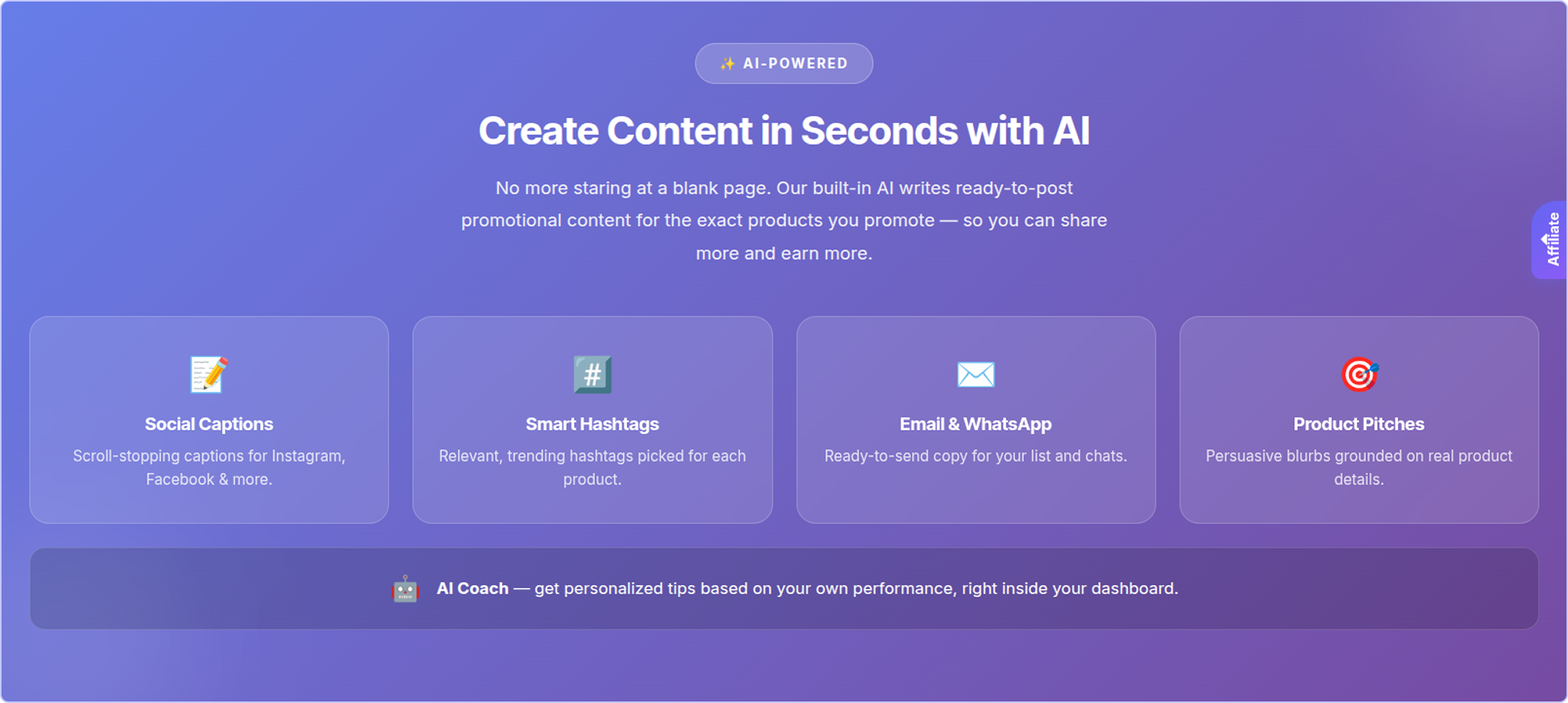
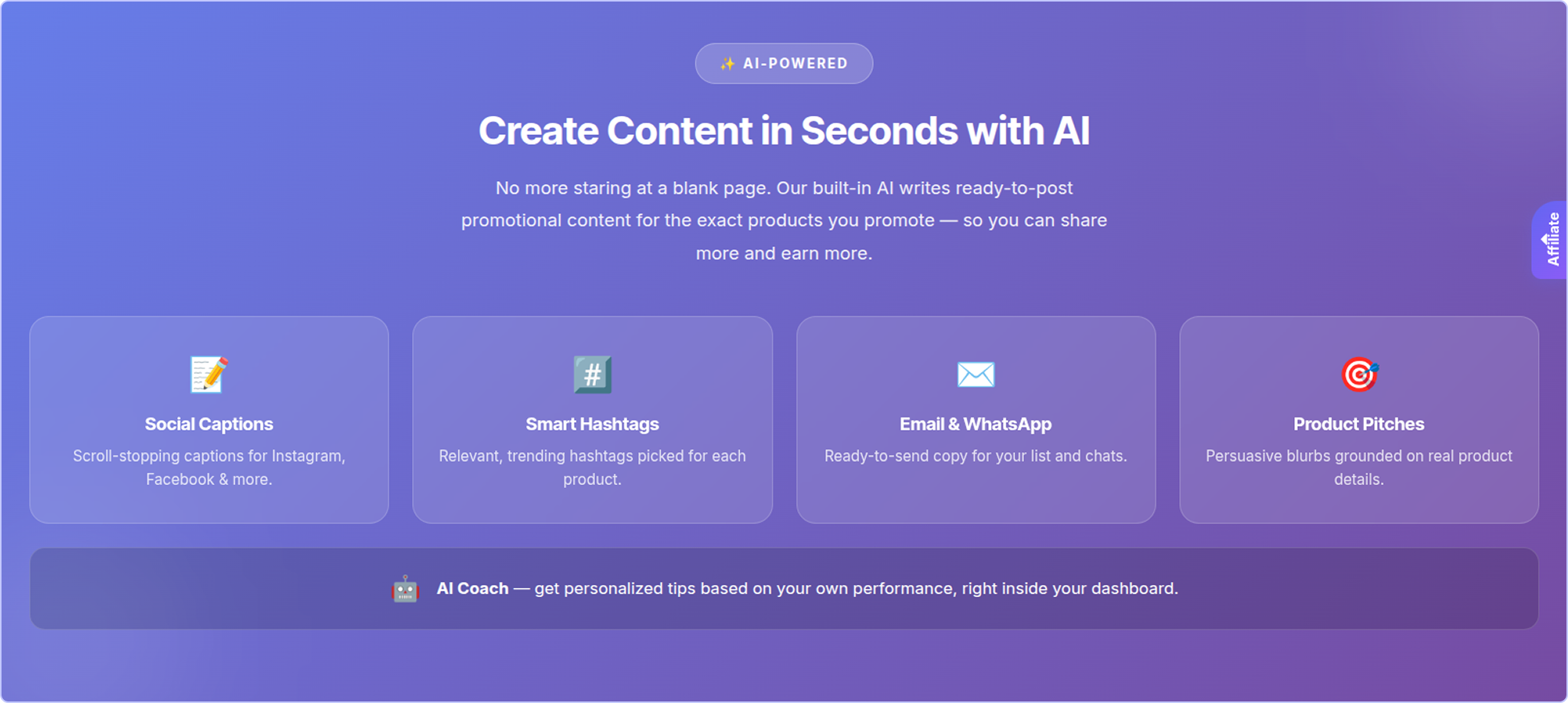
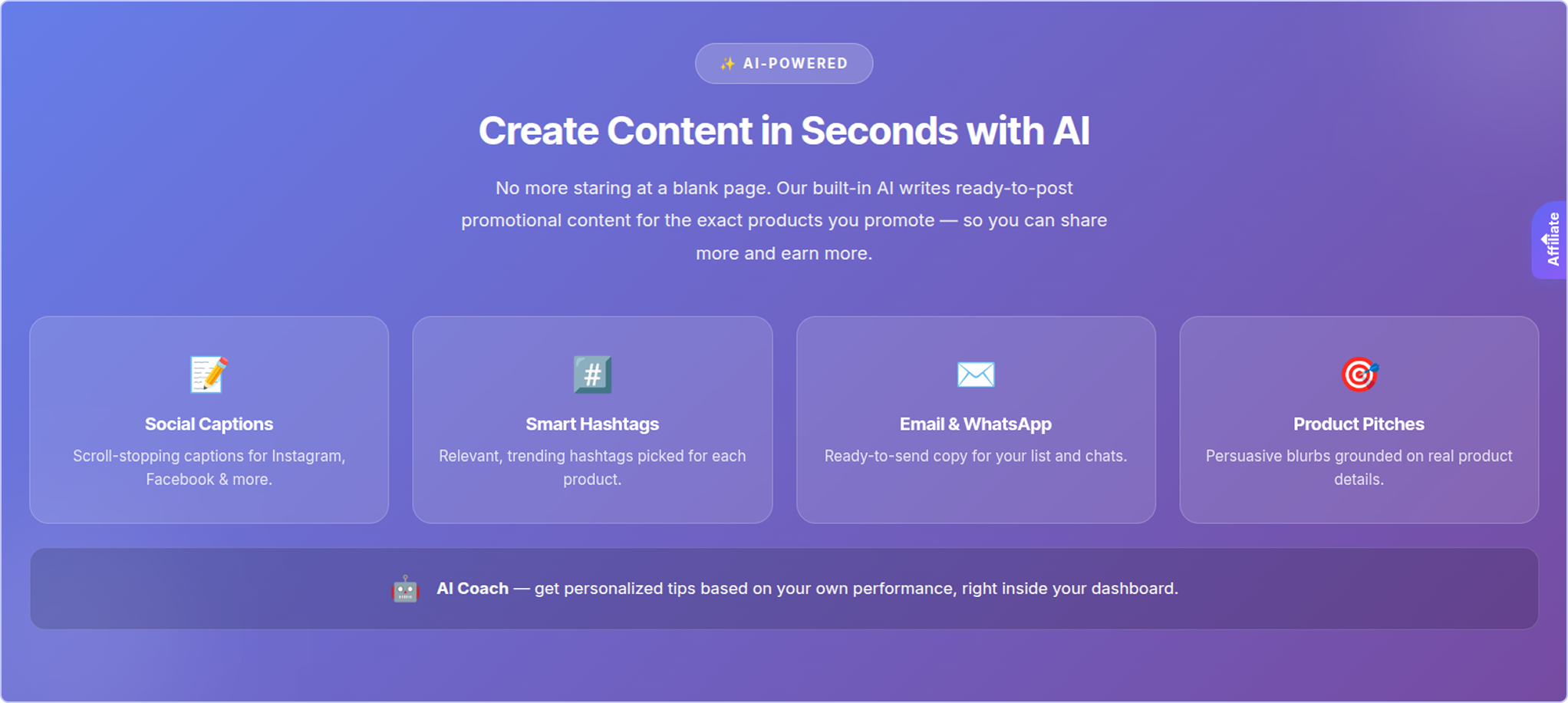
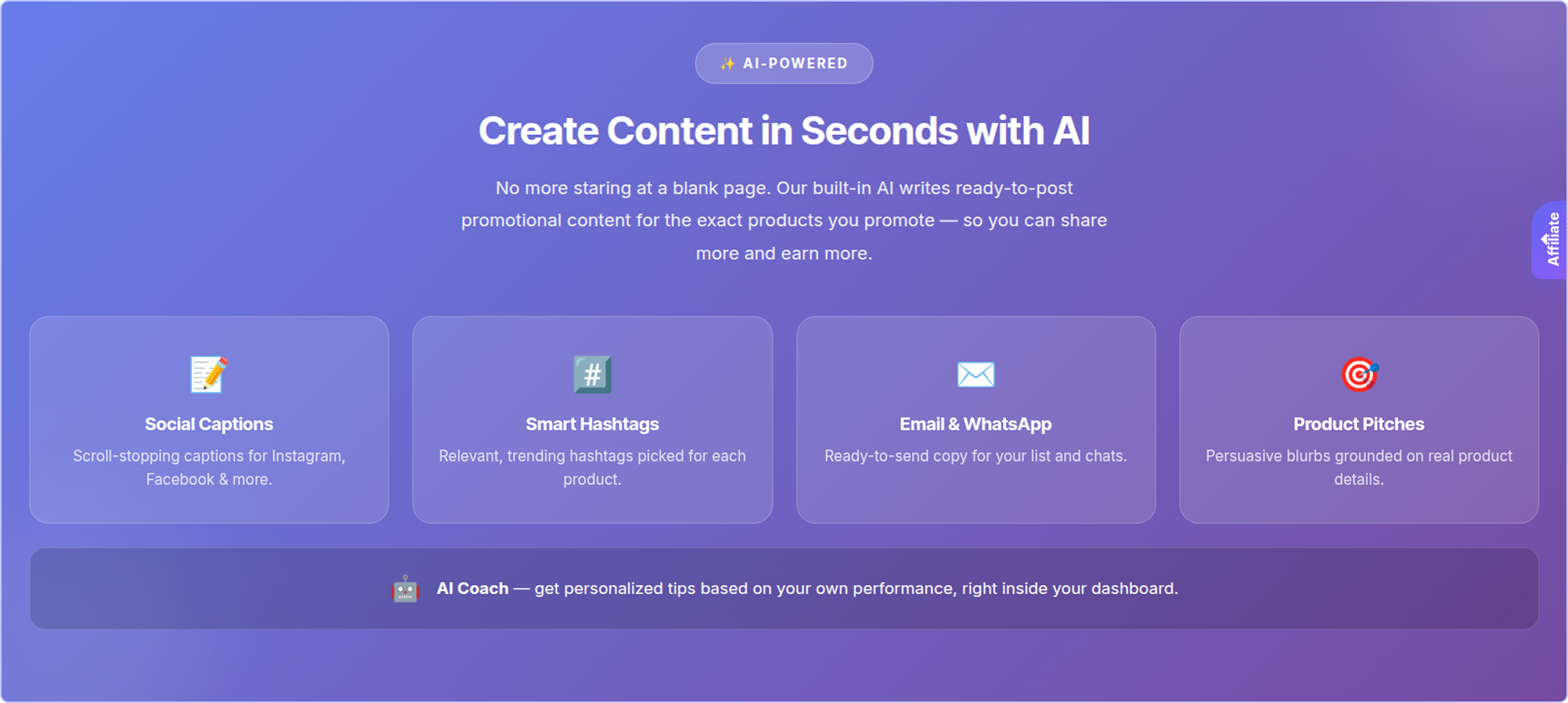
AI section on the landing page
A new section is added to your public affiliate landing page. It shows what the AI can do: social captions, smart
hashtags, email and WhatsApp copy, product pitches and the AI Coach.
This helps you recruit new affiliates. It is shown to everyone, even visitors who are not logged in.

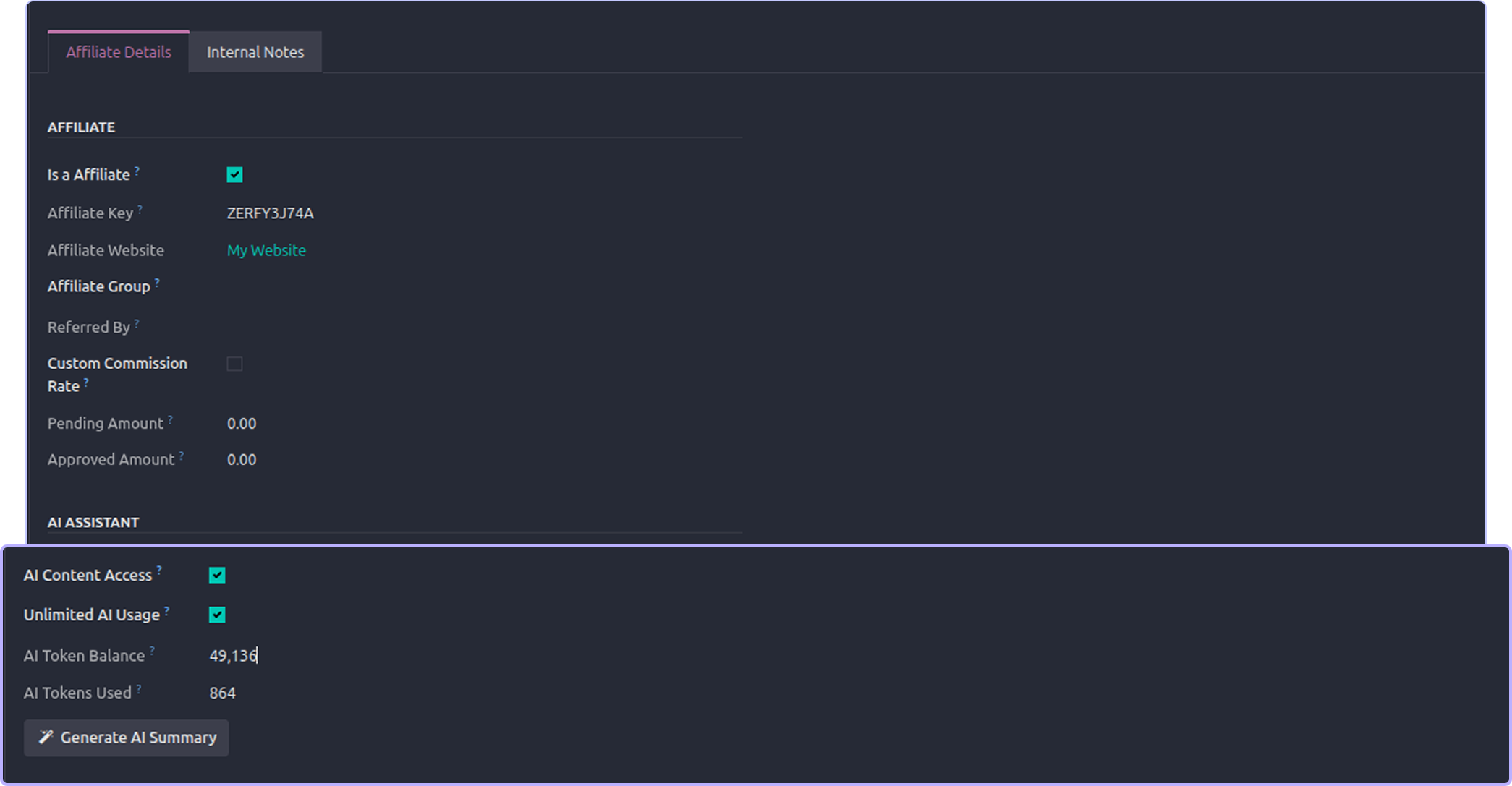
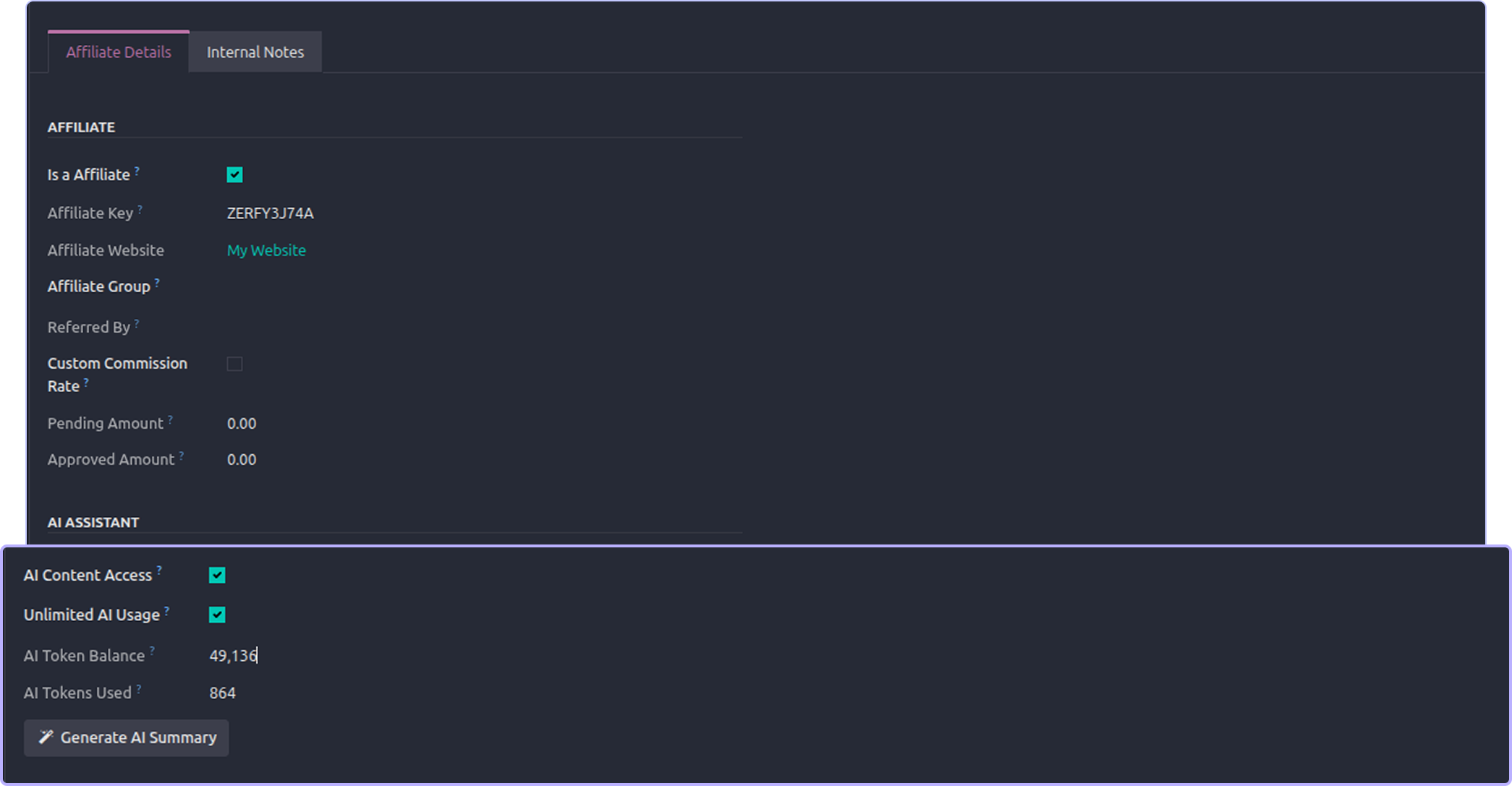
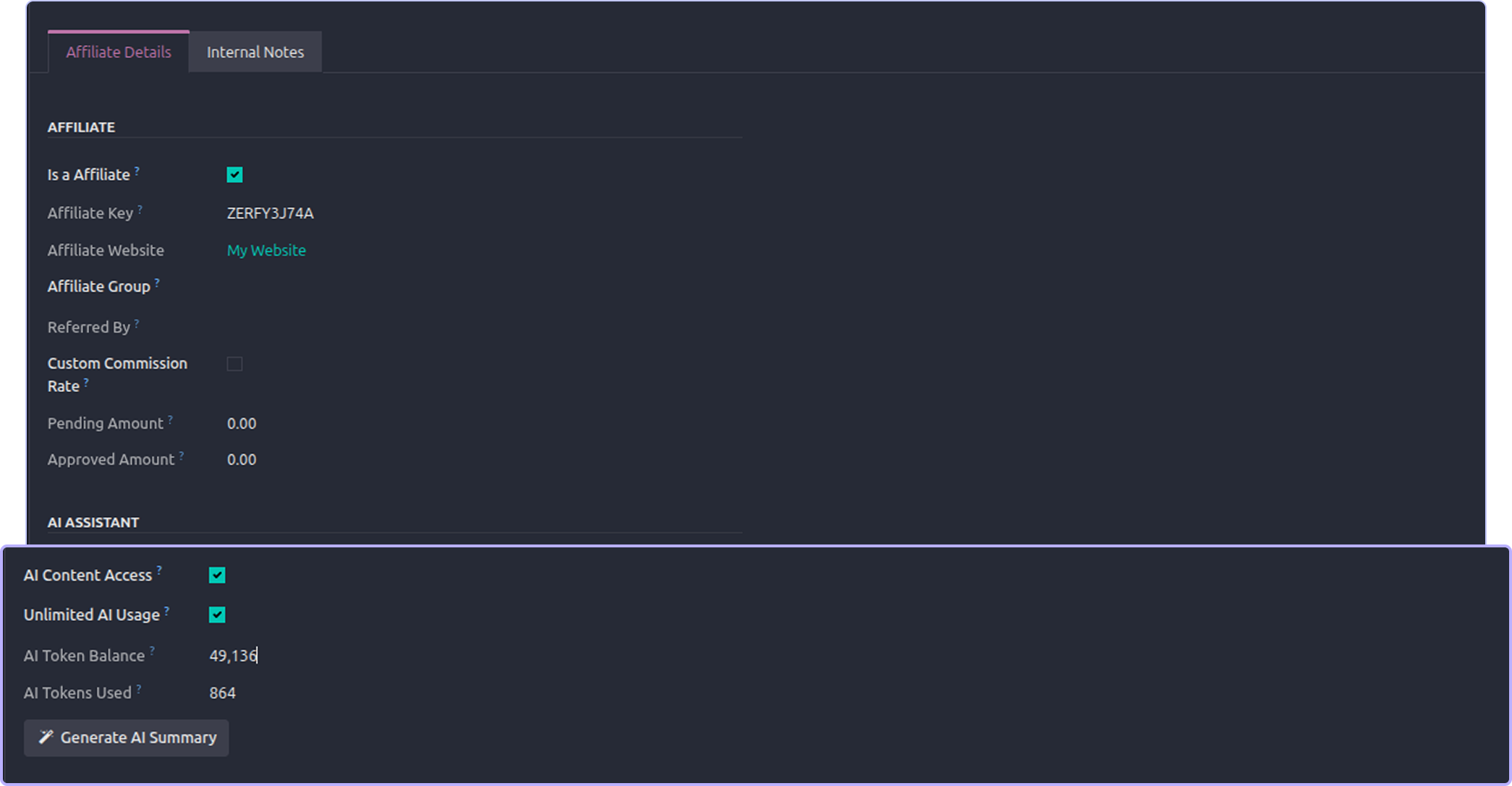
AI summary of an affiliate
Open any affiliate and click generate AI summary.
You get 2 - 3 sentences. The AI tells you if this affiliate is a top performer, steady, or going quiet. Then it gives one
clear suggestion, like a tier bump, a bonus, or a re-engagement message.
The summary is saved on the record. Click again to refresh it.

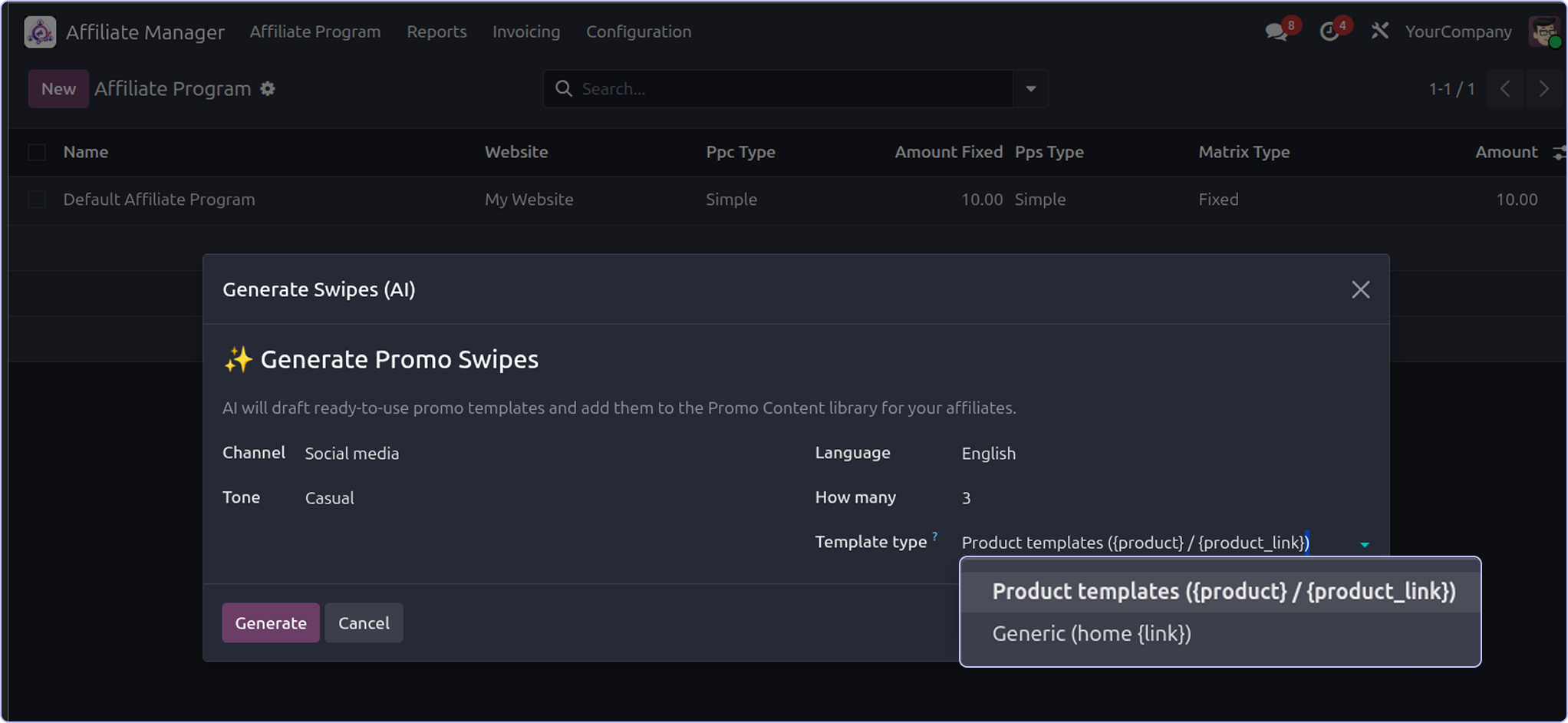
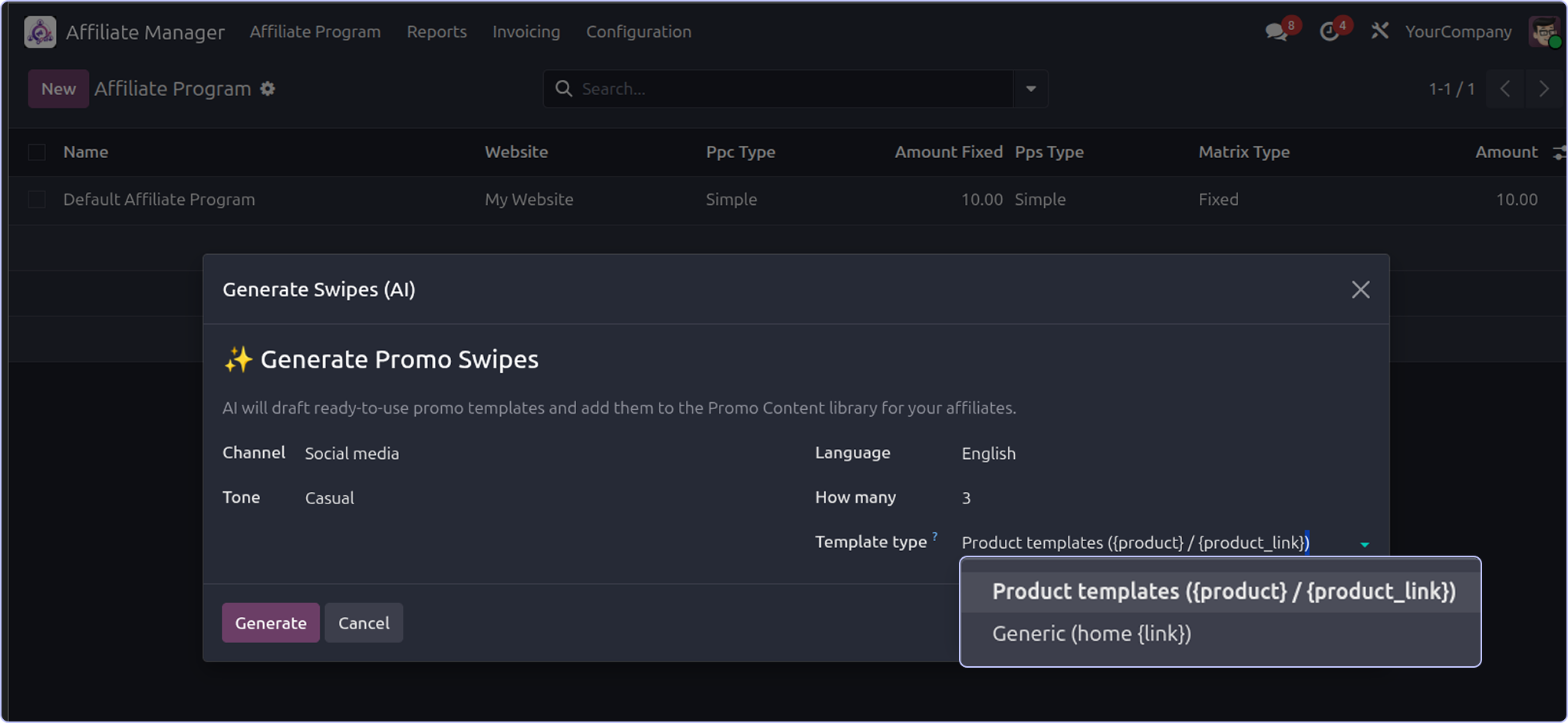
Bulk promo templates
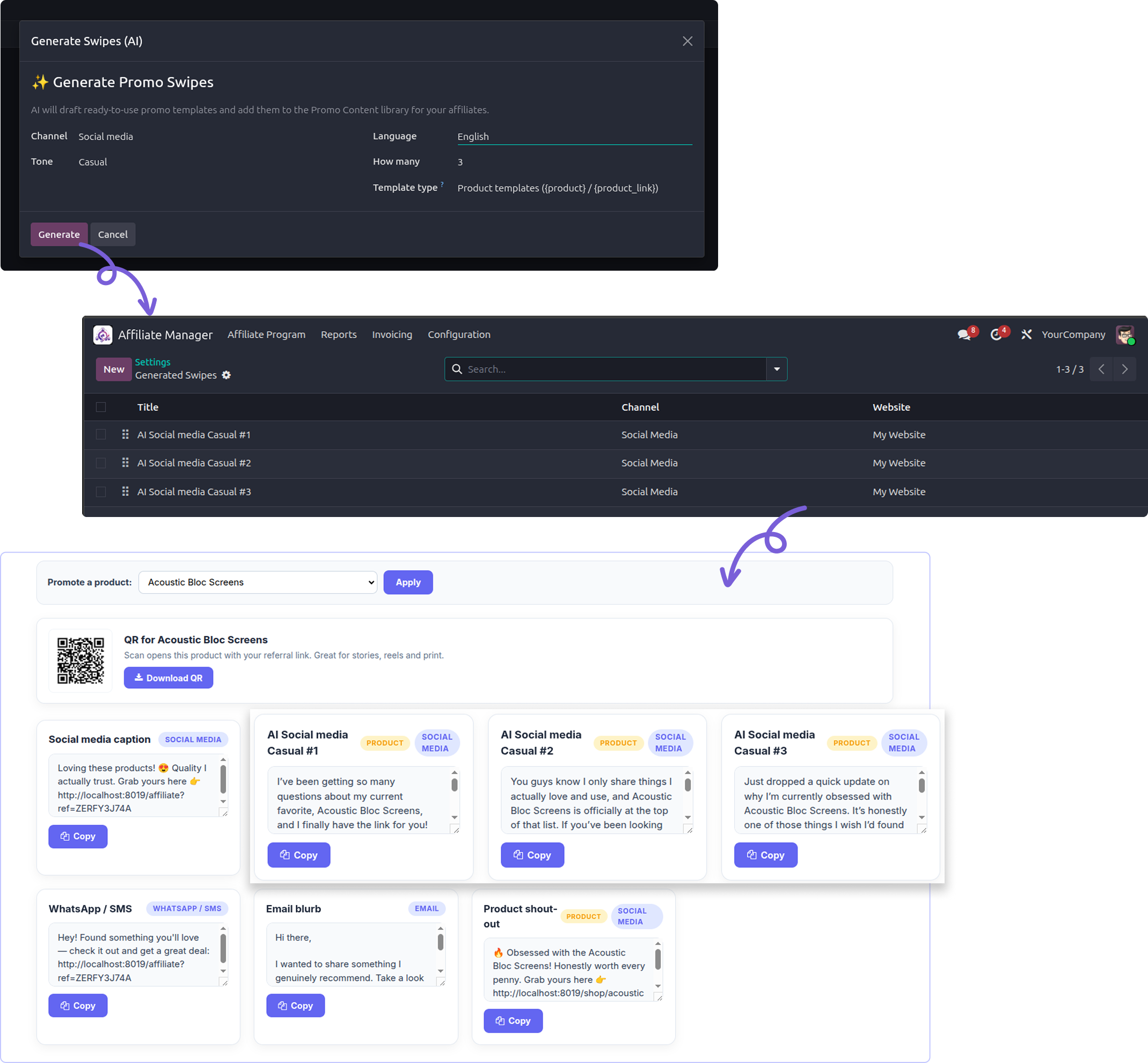
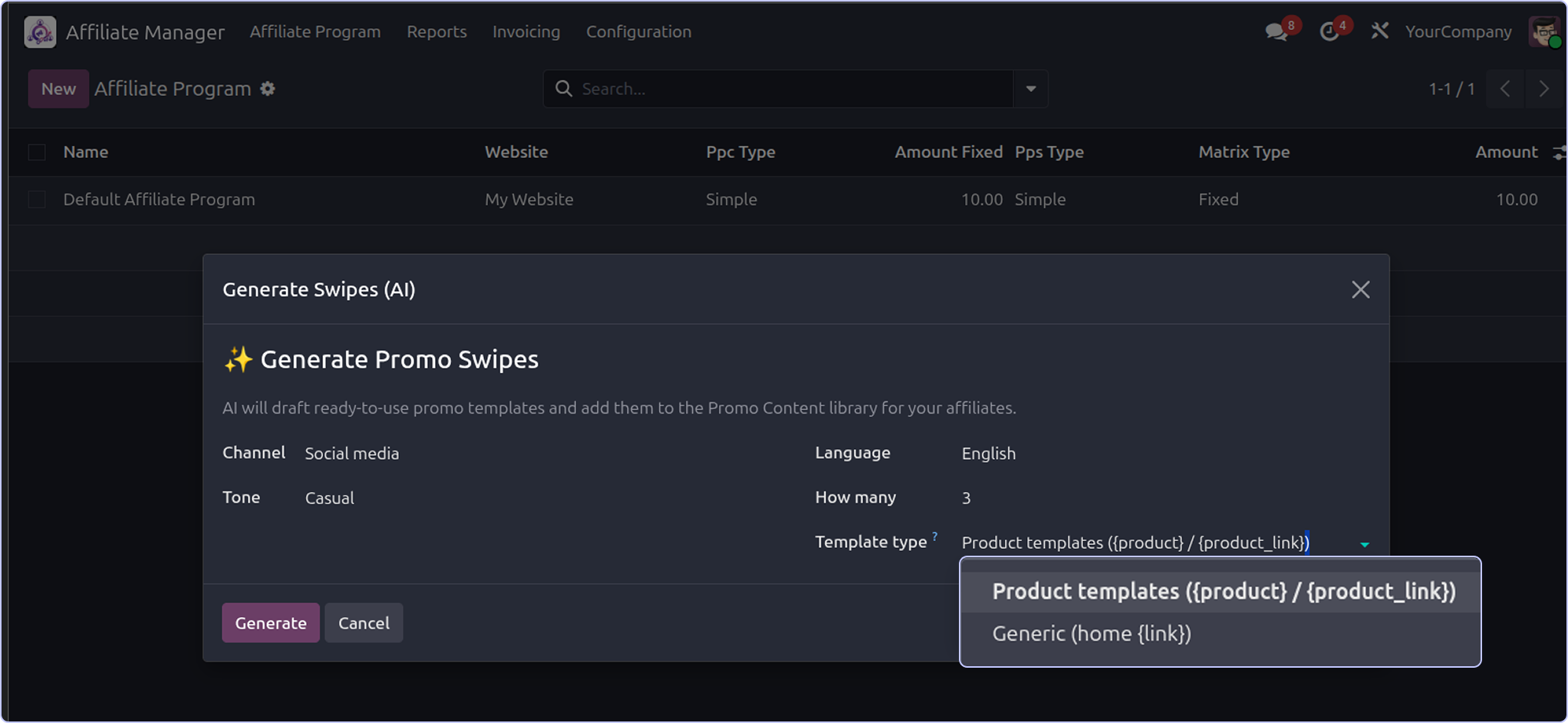
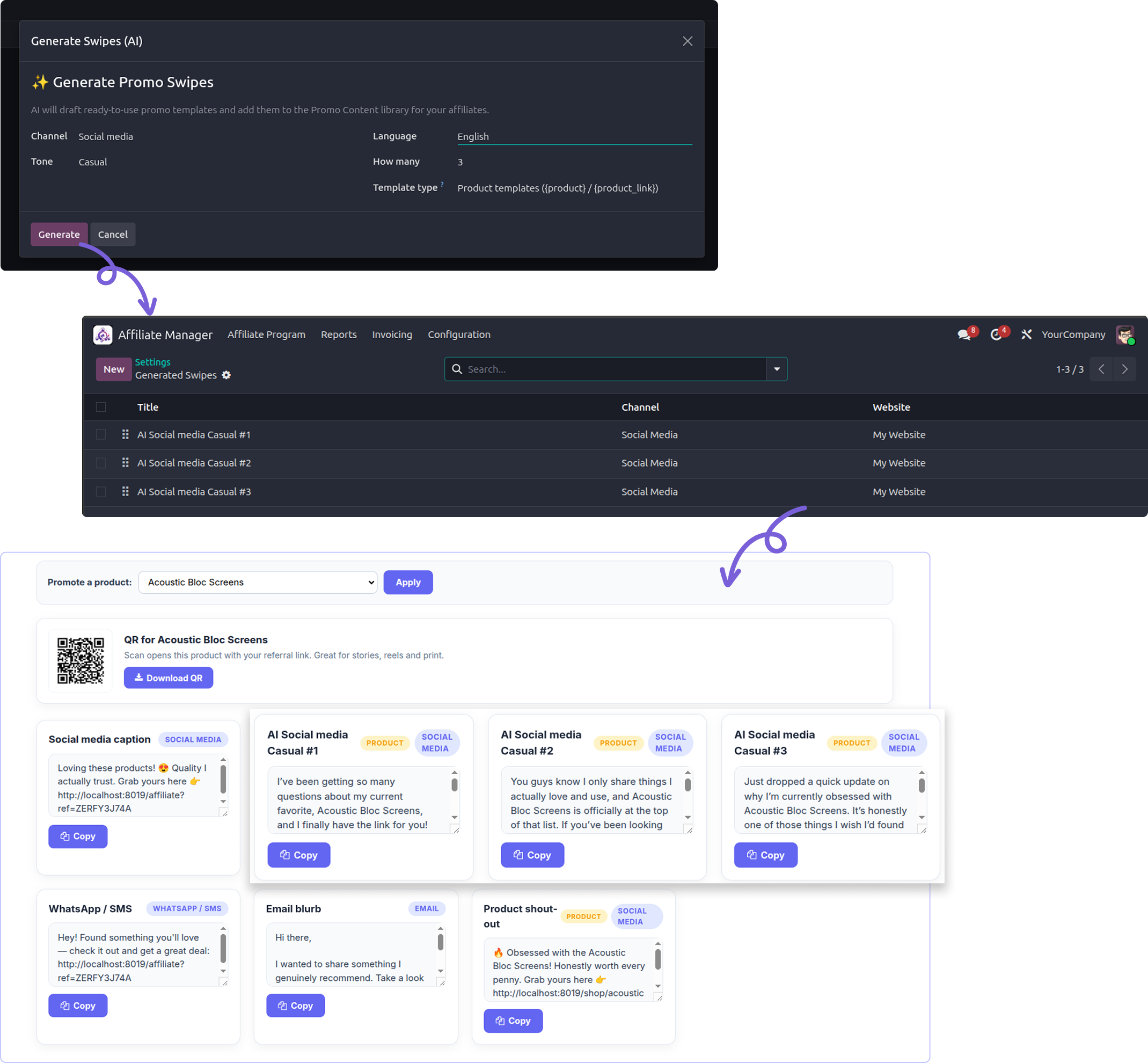
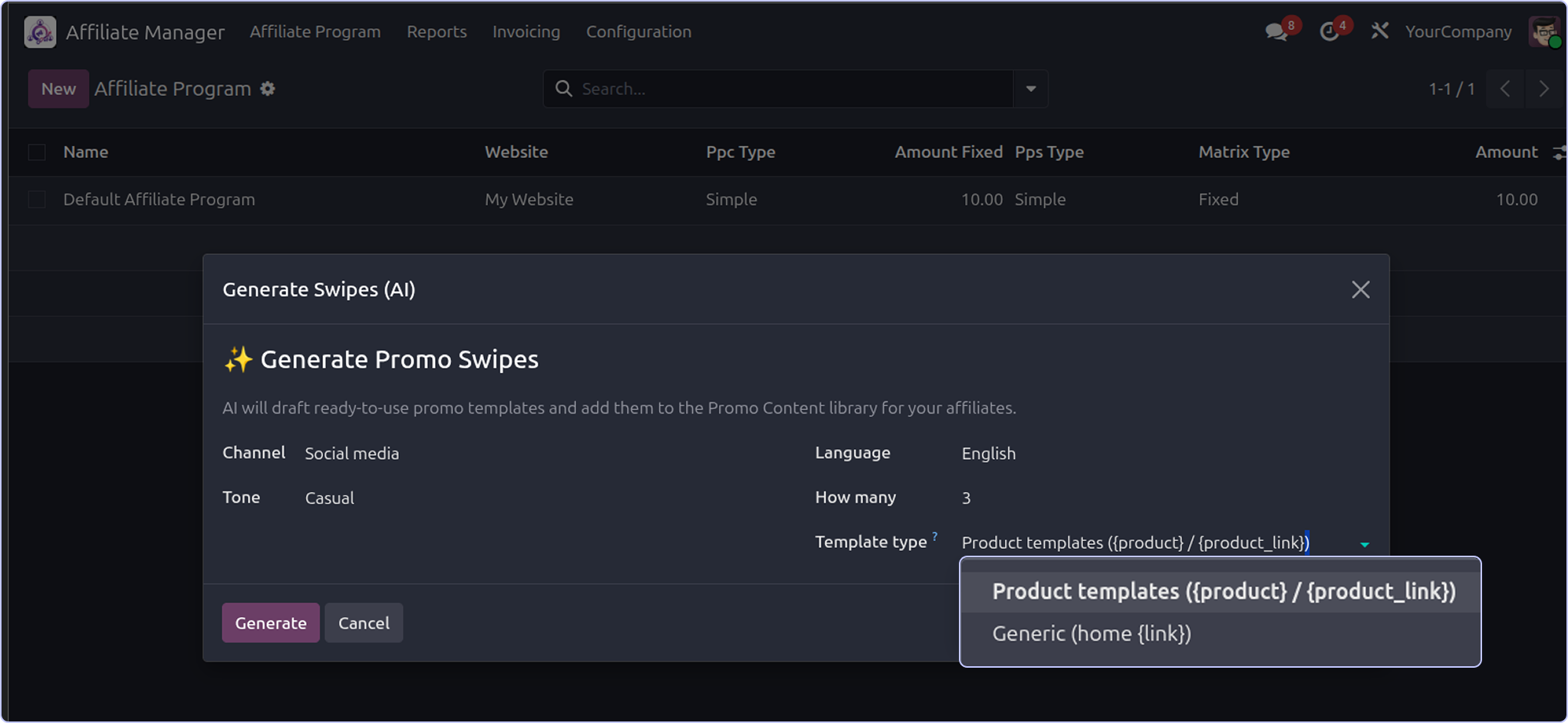
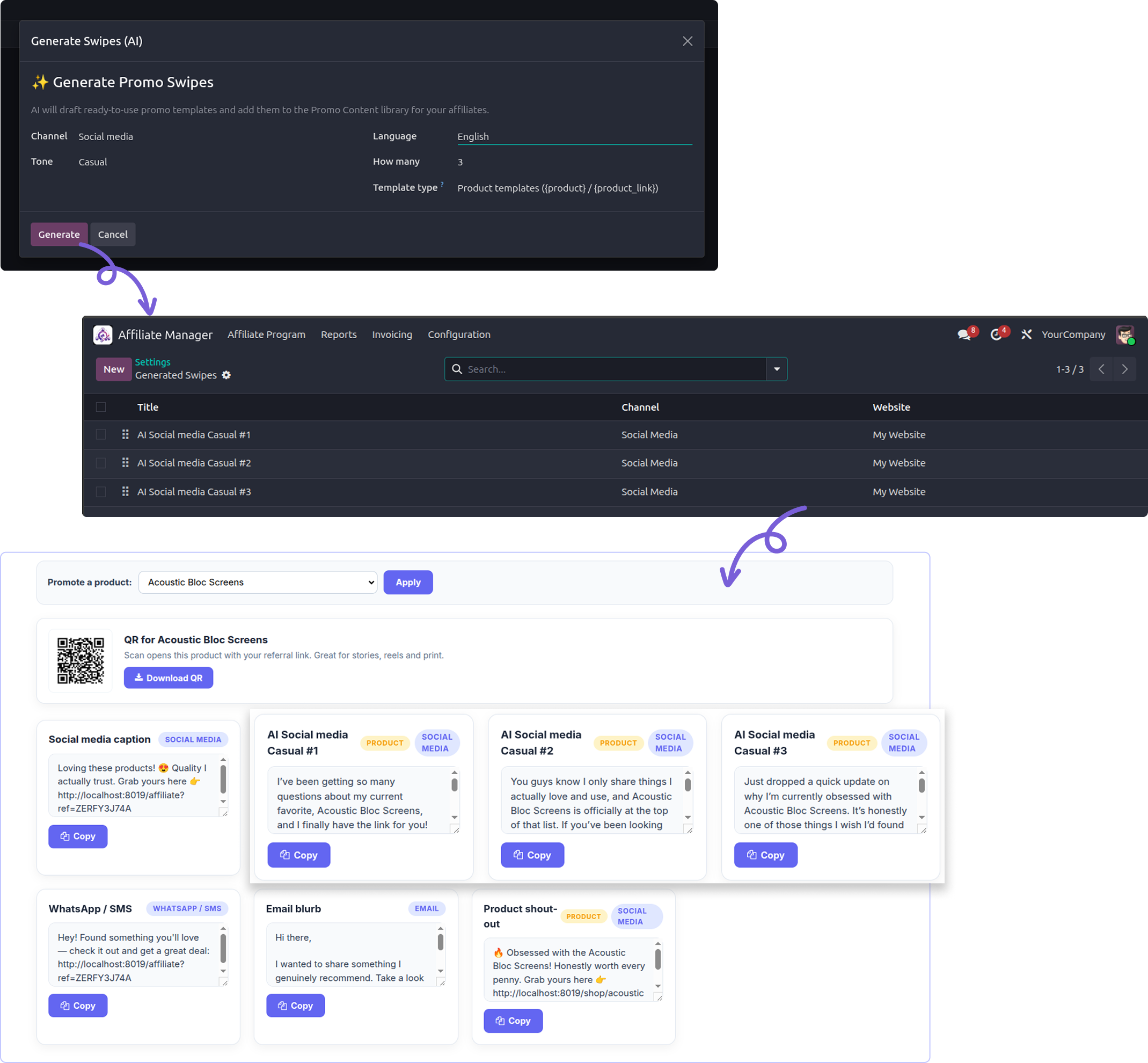
Menu: Affiliate -> Configuration -> Generate Swipes (AI).
Pick a channel, a tone, a language and how many you want. Click Generate. The AI writes that many promo templates
and saves them in your Promo Content library. All your affiliates can then use them.
Two template types :-
- Product templates - use {product} and {product_link}. One template works for any product.
- Generic - user {link}, the affiliate's home referral link.
After it runs, Odoo opens the list of new records. You can edit or delete them before affiliates see them.

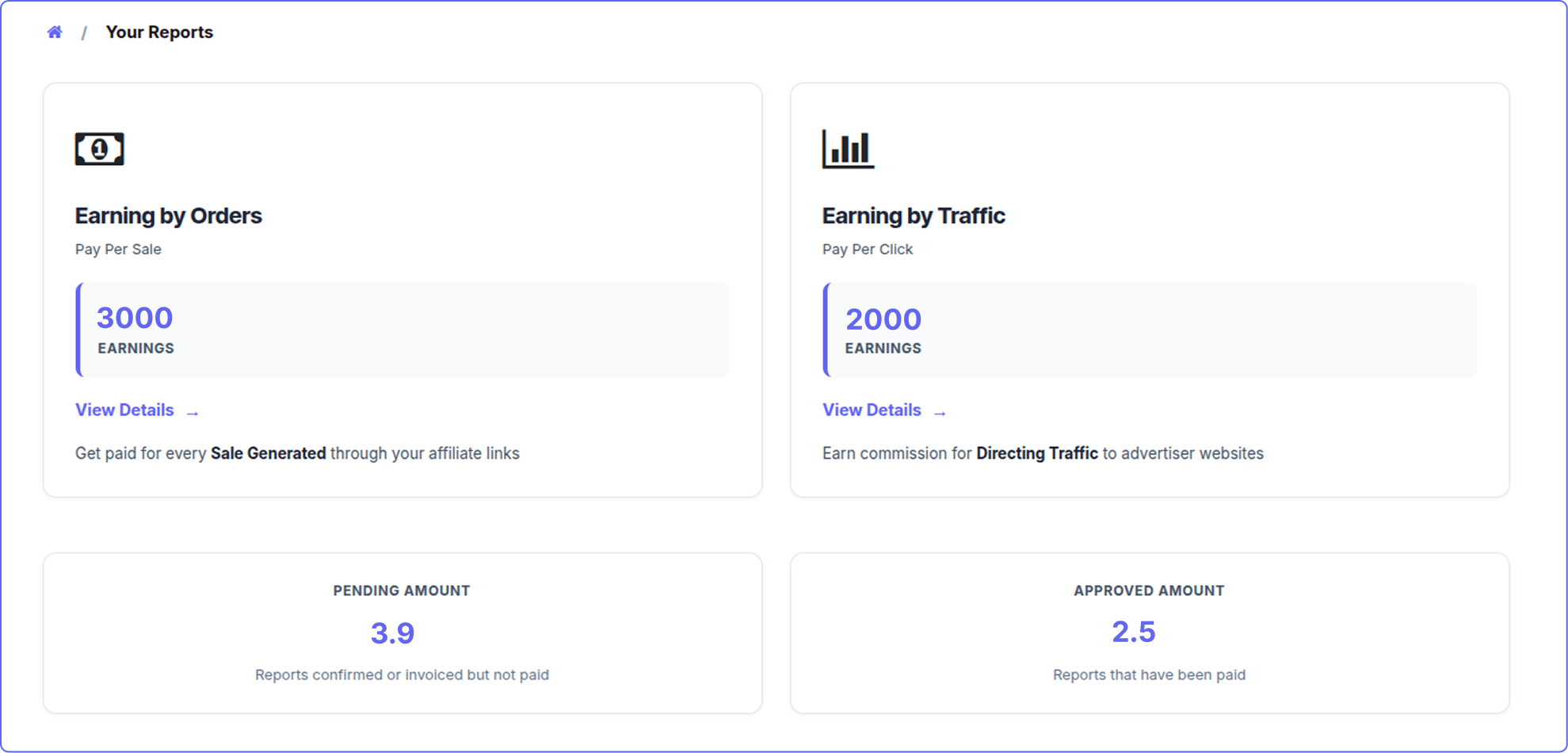
AI program assistant
Open Affiliate Analysis. Click the cog (Actions) menu. Choose AI Program Insights.
Button 1 - Full Program Insights
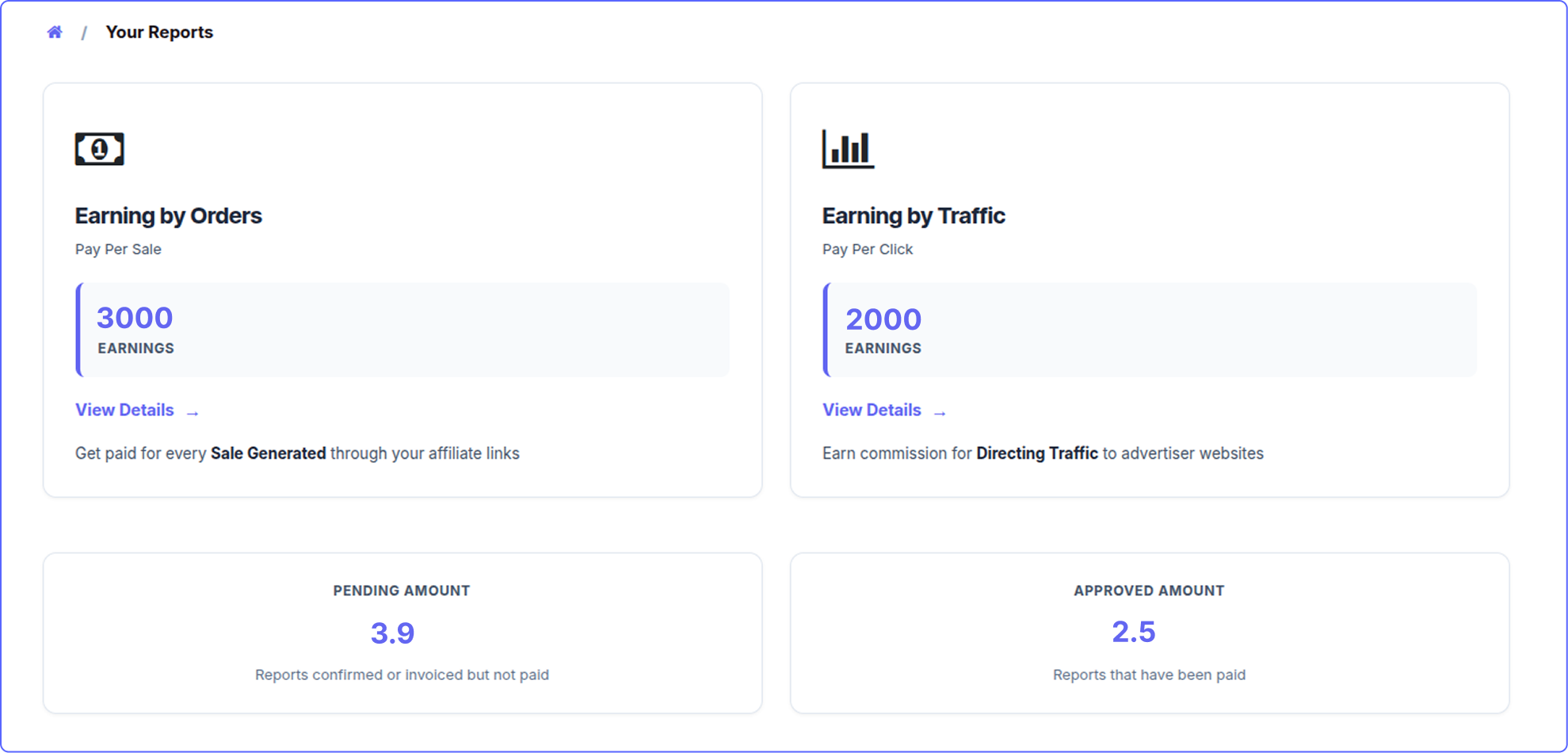
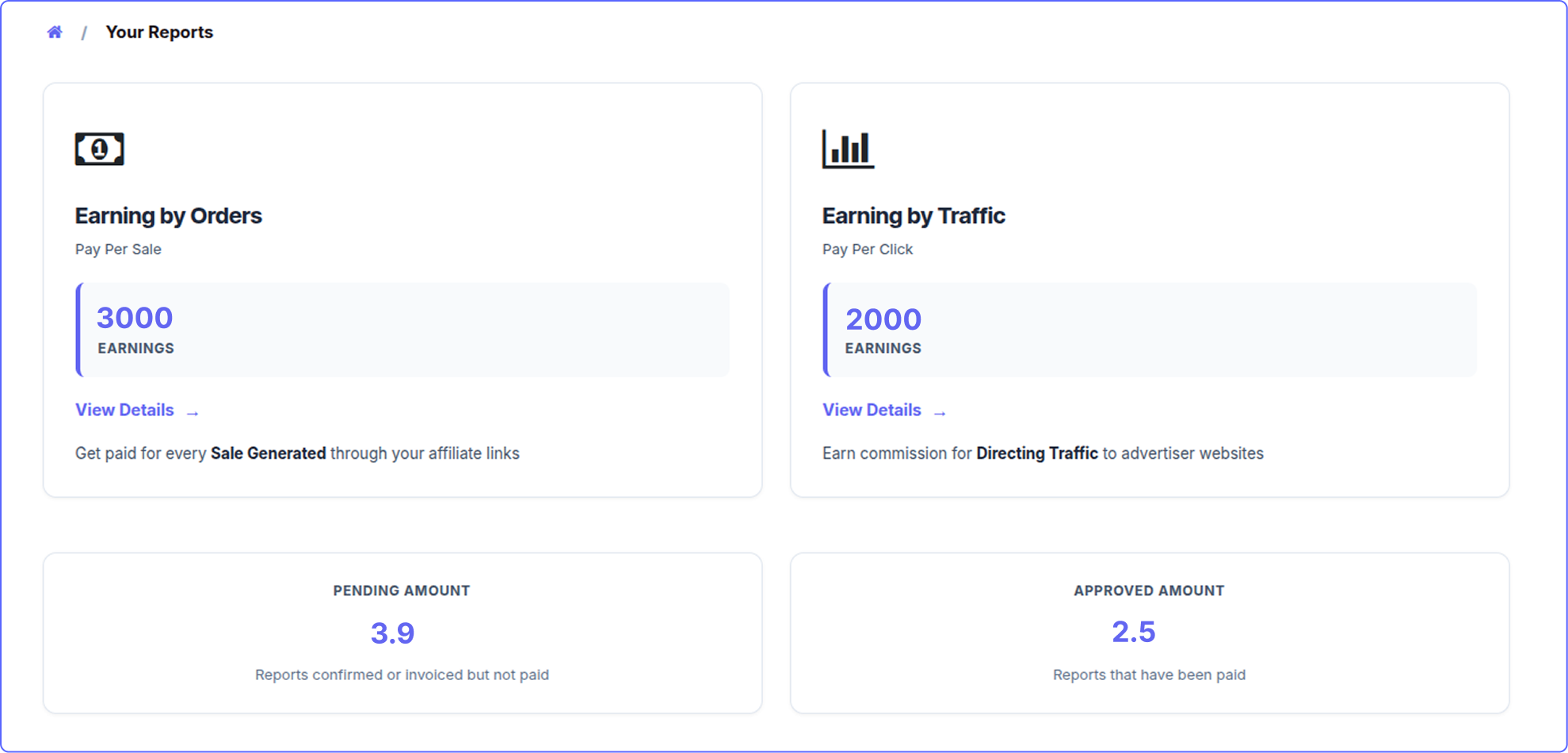
You get KPI cards: total affiliates, sales, clicks, conversion rate, pending commission and paid commission. Below them,
tables of your top affiliates and top products. Then the AI writes a short analysis with 2-3 things you should do next.
The numbers are real
The cards and tables come straight from your database. Only the text below them is written by AI.
Button 2 - Ask
Type a question in plain English and click Ask. Lists and rankings come back as a clean table.
Examples :
- "Show me the top 5 affiliates by sales."
- "List all inactive affiliates."
- "Which products convert best?"
- "Who has a custom commission rate?"
- "How much commission is still pending?"

AI usage log
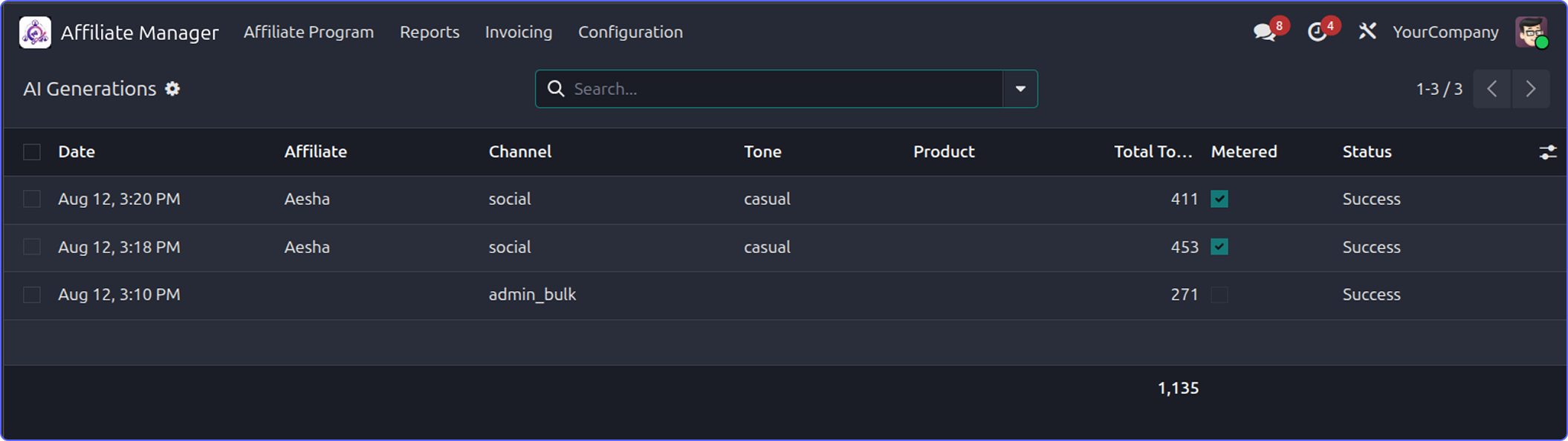
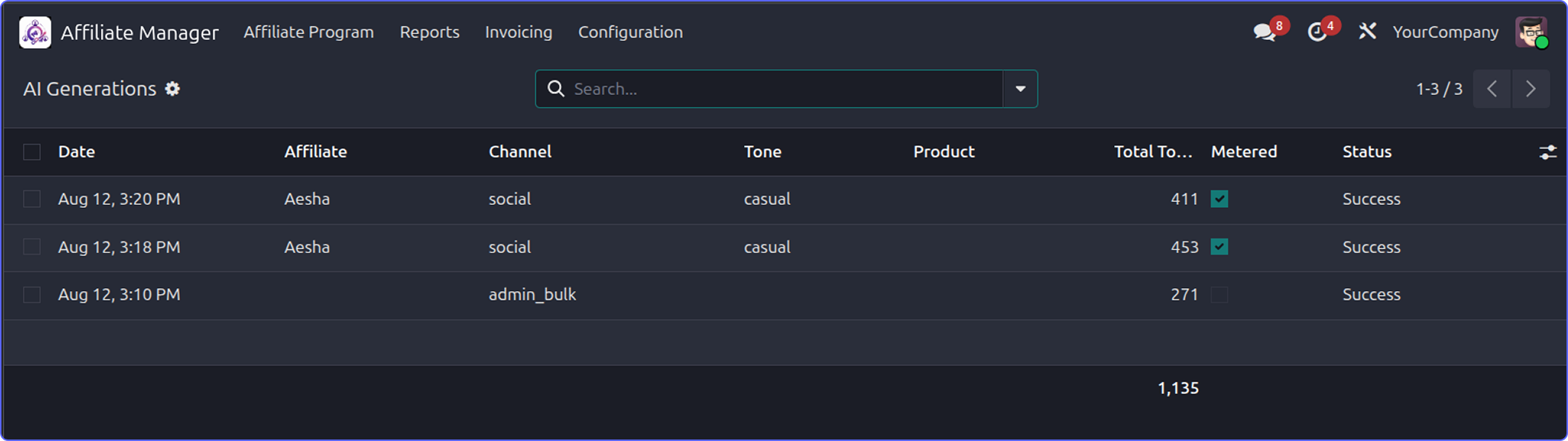
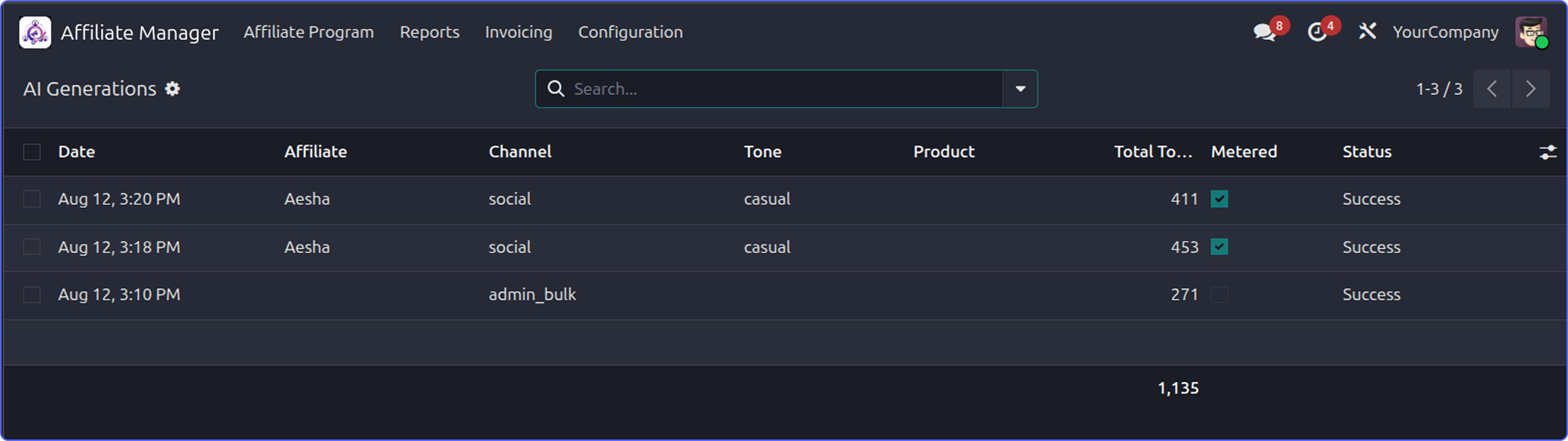
Menu: Affiliate -> Reporting -> AI Generations.
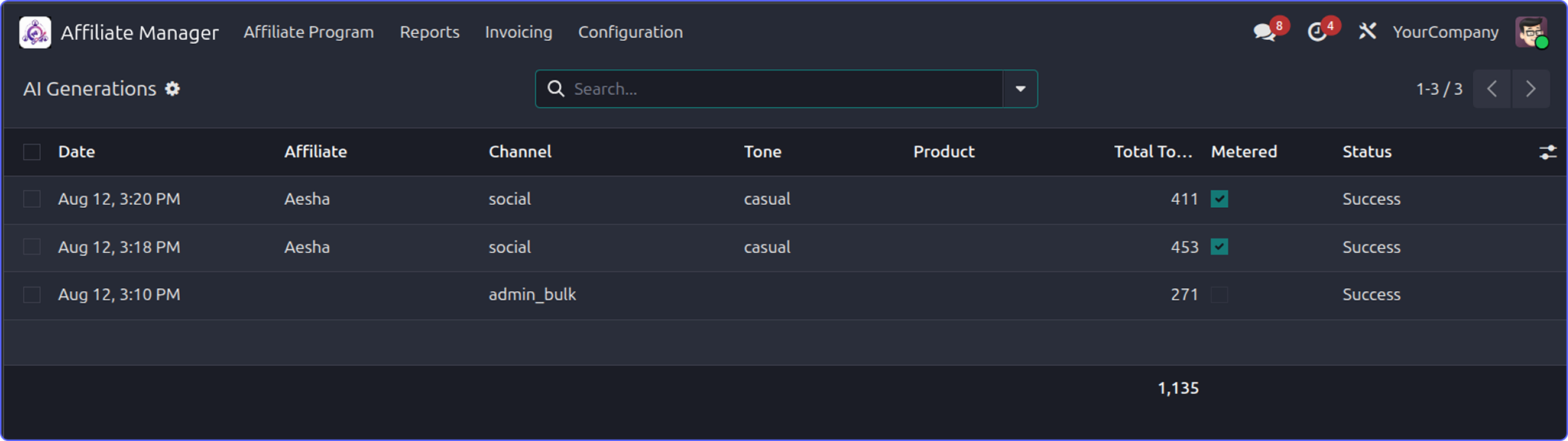
Every AI request creates one line here. Success or failure, affiliate or admin. Nothing is hidden.
- Date - When it ran. Newest first.
- Affiliate - Who asked. Empty for program-wide admin requests.
- Channel / Tone / Language - What was asked for.
- Product - The product being promoted, if any.
- AI Model - Which model answered.
- Prompt / Completion / Total Tokens - The exact token cost. The list adds up the total.
- Metered - Yes if it used the affiliate's balance.
- Status - Success or Error. Errors keep the reason.
- Prompt & Generated Content - The full text sent and received. Open the record to see it.
Tip
Group the list by Affiliate. The Total Tokens sum shows you who is spending the most.

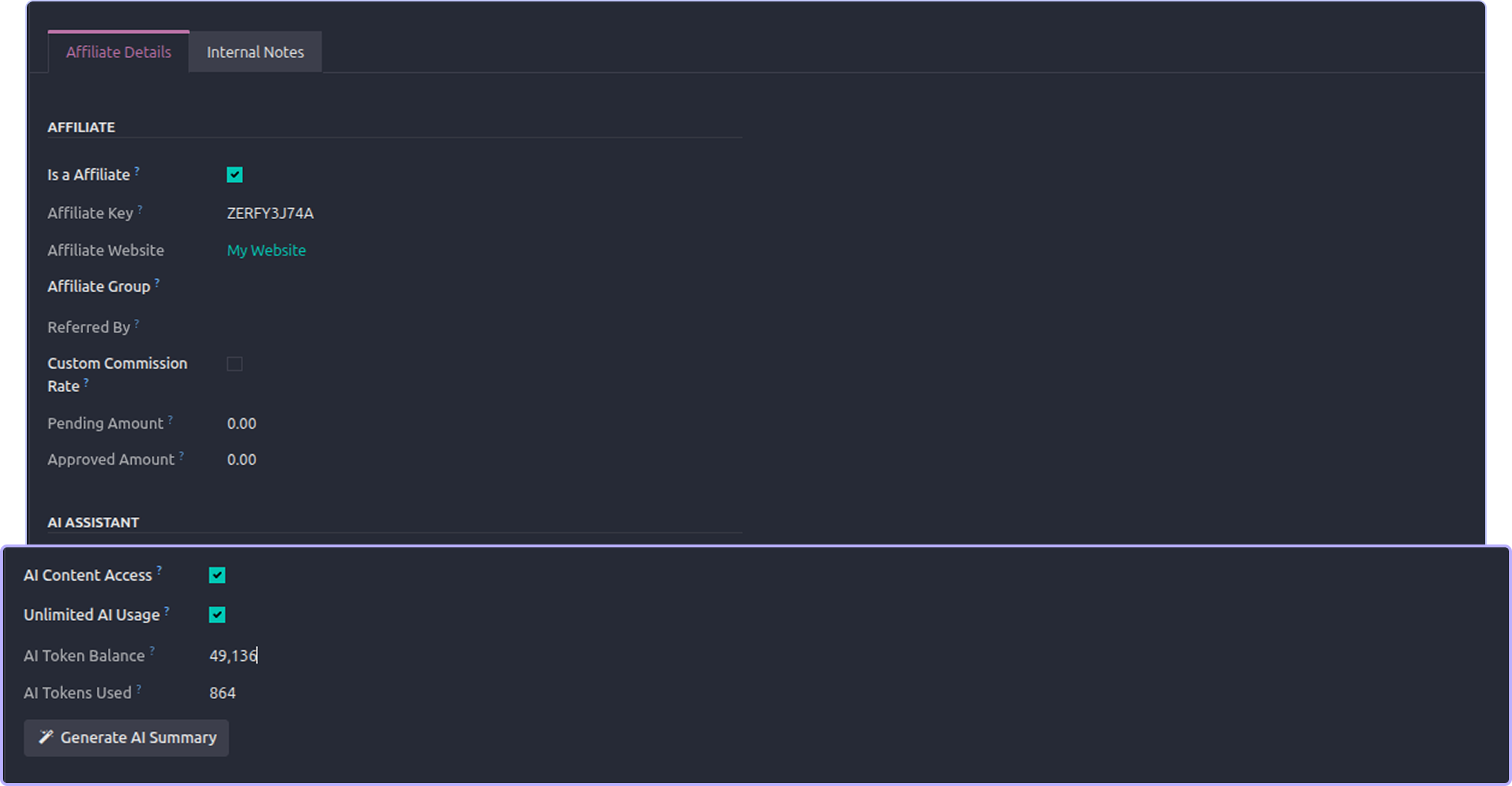
Token control
AI costs money. So each affiliate has a token balance.
- Set a default grant. New approved affiliates get it automatically.
- Give one affiliate unlimited use with a single tick.
- Or turn off metering for everyone with one switch.
- Top up any balance by typing a new number.
- Admin AI tools never use anyone's tokens.

Works with any AI provider
You bring your own AI account. Pick your provider and the API URL fills in by itself.
- OpenAI - gpt-4o-mini
- Google Gemini - gemini-2.0-flash
- Anthropic Claude - claude-haiku-4-5
- OpenRouter - openai/gpt-4o-mini
- Custom - Any OpenAI-compatible URL, including your own server.
Each provider keeps its own API key. So you can switch providers and switch back without typing keys again.


What data the AI sees
The app never sends your whole database. Each action sends only what it needs.
- Generate / AI caption - Product name, short product description, the referral link, and the affiliate's brief.
- Improve / Translate - Only the text the affiliate pasted.
-
Ask AI / AI Coach - That one affiliate's own data: currency, referral link, commission plan and rates, tier ladder, sales,
clicks, earnings, top products, last sale, team totals, payout rules and commission rules. - Affiliate summary - The same data, for the affiliate you selected.
- Program insights / Admin ask - Program totals, plus a list of up to 60 affiliates with their group, rate, sales, clicks, commission, status and referrer. Also top products, the program plan, tiers and groups.
Please check this
Affiliate names and numbers are sent to your AI provider when you use the admin reports. Check your provider's
data policy first. No customer names, emails, addresses or payment details are ever sent.

Security

Two switches must be on: the global one and the affiliate's own one.
Turning off the master switch stops AI for everyone at once.
Admin AI tools check the Affiliate Manager group first. A portal user cannot reach them, even by calling the server directly.
An affiliate can only ever see their own data. There is no way to ask about someone else.
The portal endpoint checks access again on every request, not just when the page loads.
API keys are stored per provider and shown hidden.
Affiliate users can read the log. Only managers can change or delete it.
Error details are kept in the server log. Users only see a simple "please try again" message.

Need Help ?
You can instantly find the answer you need here when
you're looking for a quick solution.

No. Any OpenAI-compatible service works. Gemini, Claude and OpenRouter are ready to pick. "Custom" accepts your own URL.
No. You use your own AI account and pay that provider. The token balances here are just a limit you set on top.
Yes, any time. Each provider keeps its own key, so nothing is lost.
The AI panels disappear and new requests stop. Old content, templates and logs stay safe.
No. Tokens are only taken after a good answer.
No. The AI only reads the logged-in affiliate's own record.
Yes. They are normal Promo Content records. Edit, rename or delete them.
The KPI cards and tables are real database numbers, so they are always correct. The text below is the AI's opinion. Treat it as a suggestion.
No. You only need an API key. Everything else is done from the Settings page.
Yes, I do provide free support for 90 days for any queries or any bug/issue fixing.
In case of if any bug raised in the listed features of this module, I am committed to providing support free of cost. You will need to provide me server ssh access or database access in order to solve the issue.
Just drop us an email at info@terabits.xyz with your questions and doubts, we will reach out to you as soon as possible.
Changelog(s)
Each update brings improvements to make the
app work better for you.

Recommended Apps

Need any help for this module?
Contact us info@terabits.xyz for your queries



Advance Affiliate Manager with AI
An AI writer for your affiliates. They get ready-to-post captions, emails and
WhatsApp messages in one click. You get AI reports on your program. Works
with OpenAI, Gemini, Claude and OpenRouter.


What This App Does

Most affiliates stop promoting because writing is hard. This app writes for them.
It adds AI to your existing Affiliate Management module. Your affiliates open their portal and click one
button. The AI writes a post, an email or a whatsApp message. Their referral link is already inside.
They copy it and share it.
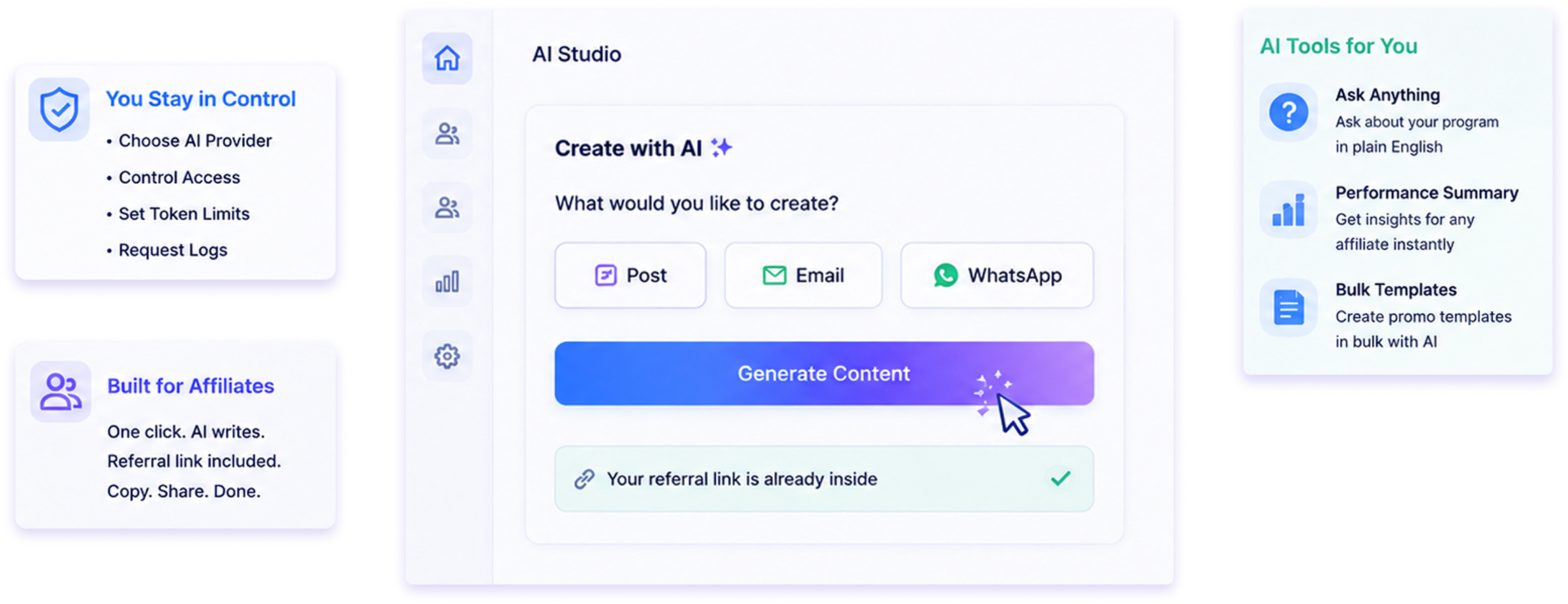
You stay in control. You choose the AI provider. You decide who can use it. You set how many tokens
each affiliate gets. Every request is saved in a log.
You also get AI tools for yourself. Ask questions about your program in plain English. Get a performance
summary for any affiliate. Create promo templates in bulk.


Key Highlights

Affiliates write posts in seconds, not hours.
Content is based on your real products, not generic
text.
Works with OpenAI, Google Gemini, Anthropic Claude,
OpenRouter or your own AI server.
Token limits stop surprise bills.
Admin AI tools are free. They never use affiliate
tokens.

The referral link is added automatically. No copy-paste
mistakes.
The AI answers questions using each affiliate's own
numbers.
You approve each affiliate one by one. Nobody
gets access by default.
Every AI request is logged with its token cost.
No coding needed. Everything is set from the
Settings page.

Writes content
Captions, emails, WhatsApp
messages, blog text and hashtags.

Answers questions
Affiliates ask. The AI replies using
their real data.

You control it
Master switch, per-affiliate
approval and token limits.

Reports for you
Program analysis and per-affiliate
summaries.


All Features

AI studio
A new AI panel on the affiliate's Promo Content page. It has four tabs.
- Generate - write new content.
- Improve - make their own text better.
- Translate - change the language.
- Ask AI - ask a question.
A badge at the top shows tokens left and tokens used. It updates after each request. If the affiliate has unlimited
use, it just says "Unlimited".

Generate content
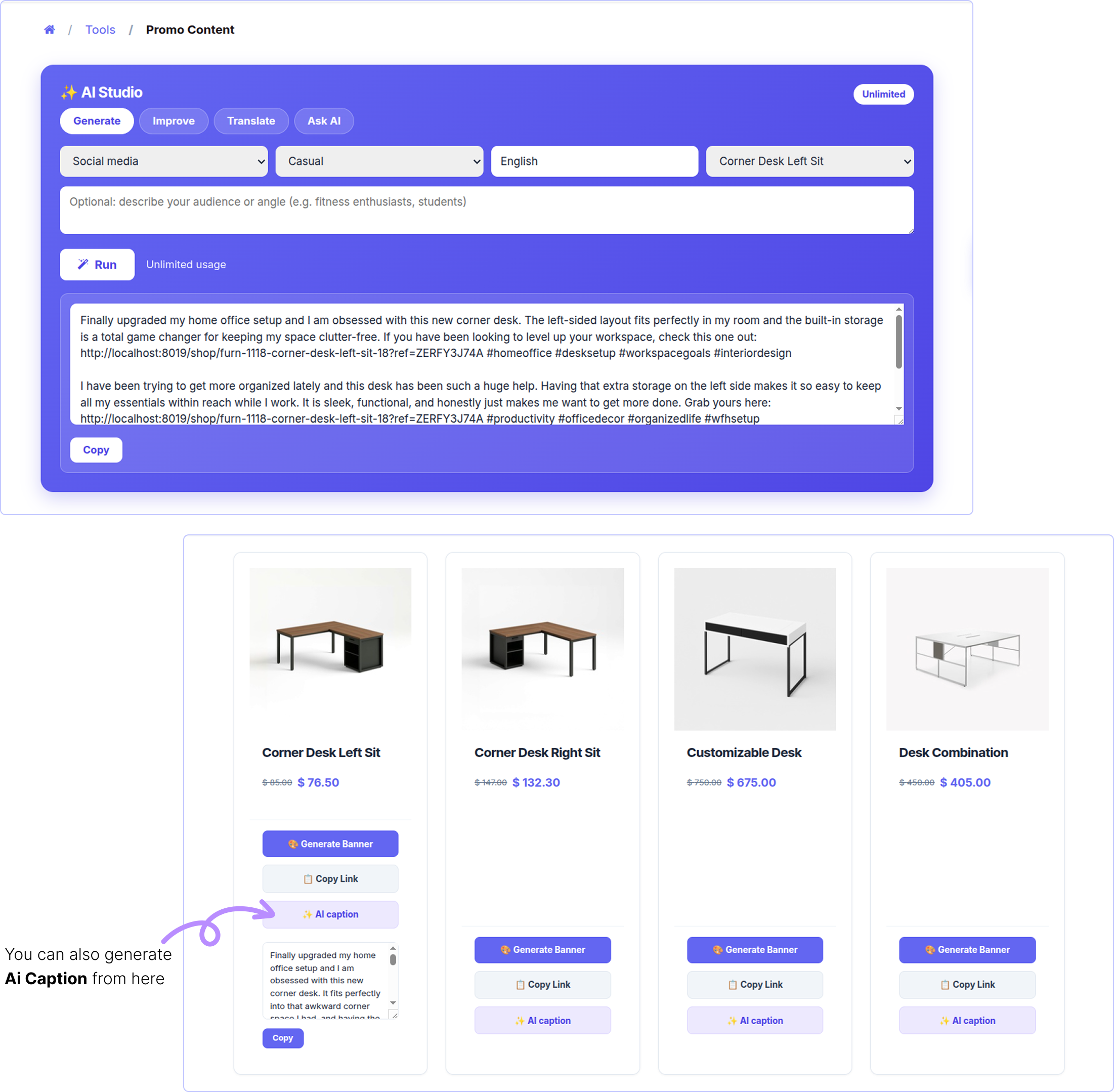
The affiliate picks a few options and clicks Run. The AI writes three different versions.
- Channel - Social media · WhatsApp / SMS · Email · Blog / review
- Tone - Casual / Professional / Funny / Urgent (FOMO)
- Language - Any language. English by default.
- Product - One of your products, or a generic store link.
- Brief - Optional. Example: "for students" or "for gym users".
A badge at the top shows tokens left and tokens used. It updates after each request. If the affiliate has unlimited
use, it just says "Unlimited".

If a product is picked, the link goes to that product page with the affiliate's ref code.
If no product is picked, the link goes to the affiliate landing page with the ref code.
The text is plain. No stars, no markdown. It pastes cleanly into Instagram or WhatsApp.
Each result has a copy button.

Improve text
The affiliate pastes their own draft. The AI makes it shorter, clearer and more convincing.
They can also add an instruction like "make it shorter" or "make it more urgent". Links and hashtags are kept as they are.

Translate Text
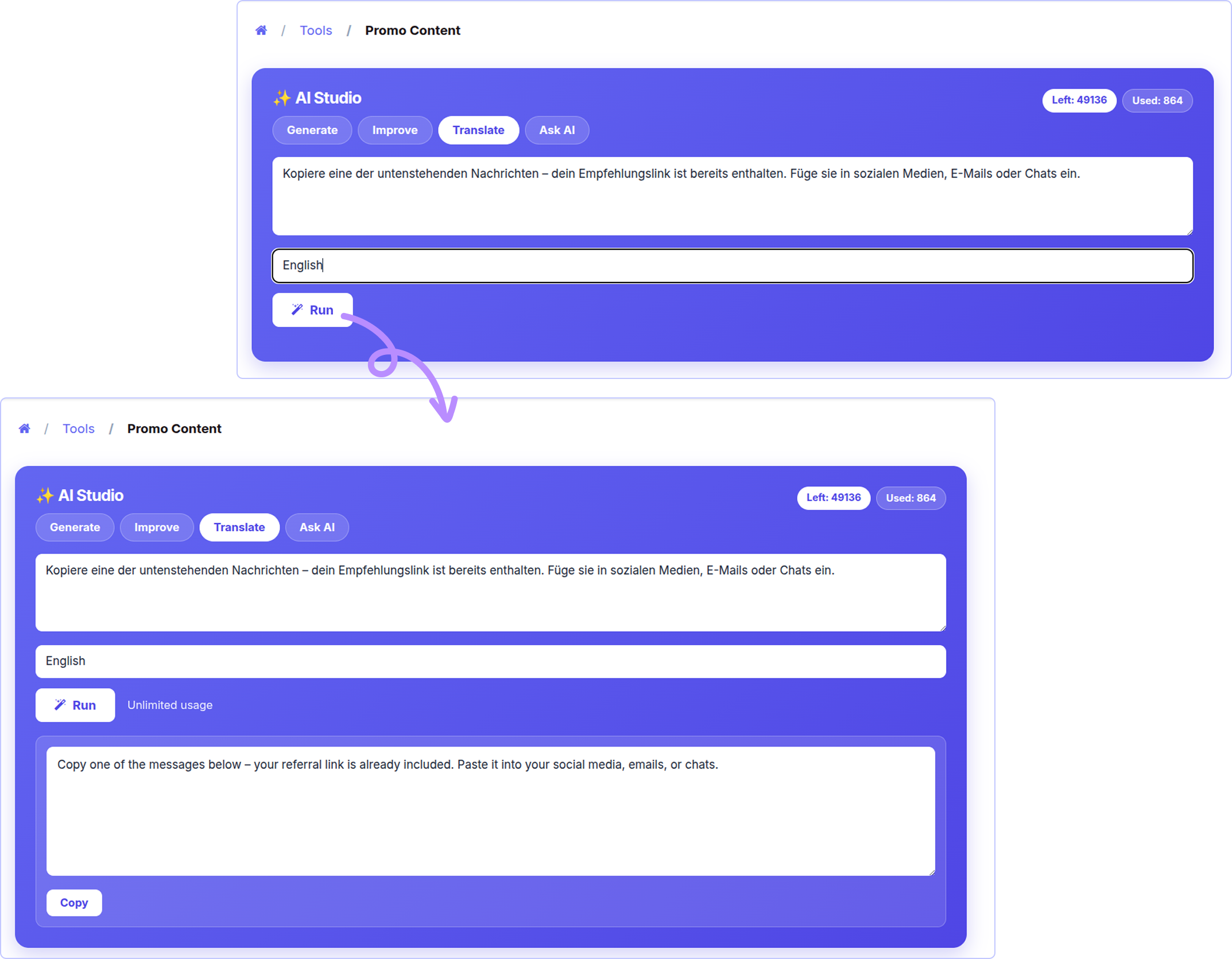
The affiliate pastes text and types a language. The AI translates it.
It is not a word-by-word translation. The AI keeps the marketing tone natural. Links, hashtags and emojis stay the same.

Ask AI
The affiliate types any question. The AI answers using their real numbers.
It knows their commission plan, tier, earnings, top products, last sale and payout rules. So the answer is about
them, not general advice.
If the answer is not in the data, the AI says so. It does not make things up.

AI coach on the dashboard
A small "Ask AI Coach" box is added to the affiliate dashboard. It sits right under the welcome message.
The affiliate types a question and clicks Ask. The answer appears below. The tokens left are shown too.
Common questions :
- "What is my commission rate?"
- "How do I reach the next tier?"
- "Which product should I promote?"
- "When do I get paid?"


One-click AI caption
On the product link page, every product gets an AI caption button.
One click writes a social caption for that product. The product referral link is inside. A Copy button appears next to it.
This is the fastest way to go from "I found a product" to "I posted about it".

AI section on the landing page
A new section is added to your public affiliate landing page. It shows what the AI can do: social captions, smart
hashtags, email and WhatsApp copy, product pitches and the AI Coach.
This helps you recruit new affiliates. It is shown to everyone, even visitors who are not logged in.

AI summary of an affiliate
Open any affiliate and click generate AI summary.
You get 2 - 3 sentences. The AI tells you if this affiliate is a top performer, steady, or going quiet. Then it gives one
clear suggestion, like a tier bump, a bonus, or a re-engagement message.
The summary is saved on the record. Click again to refresh it.

Bulk promo templates
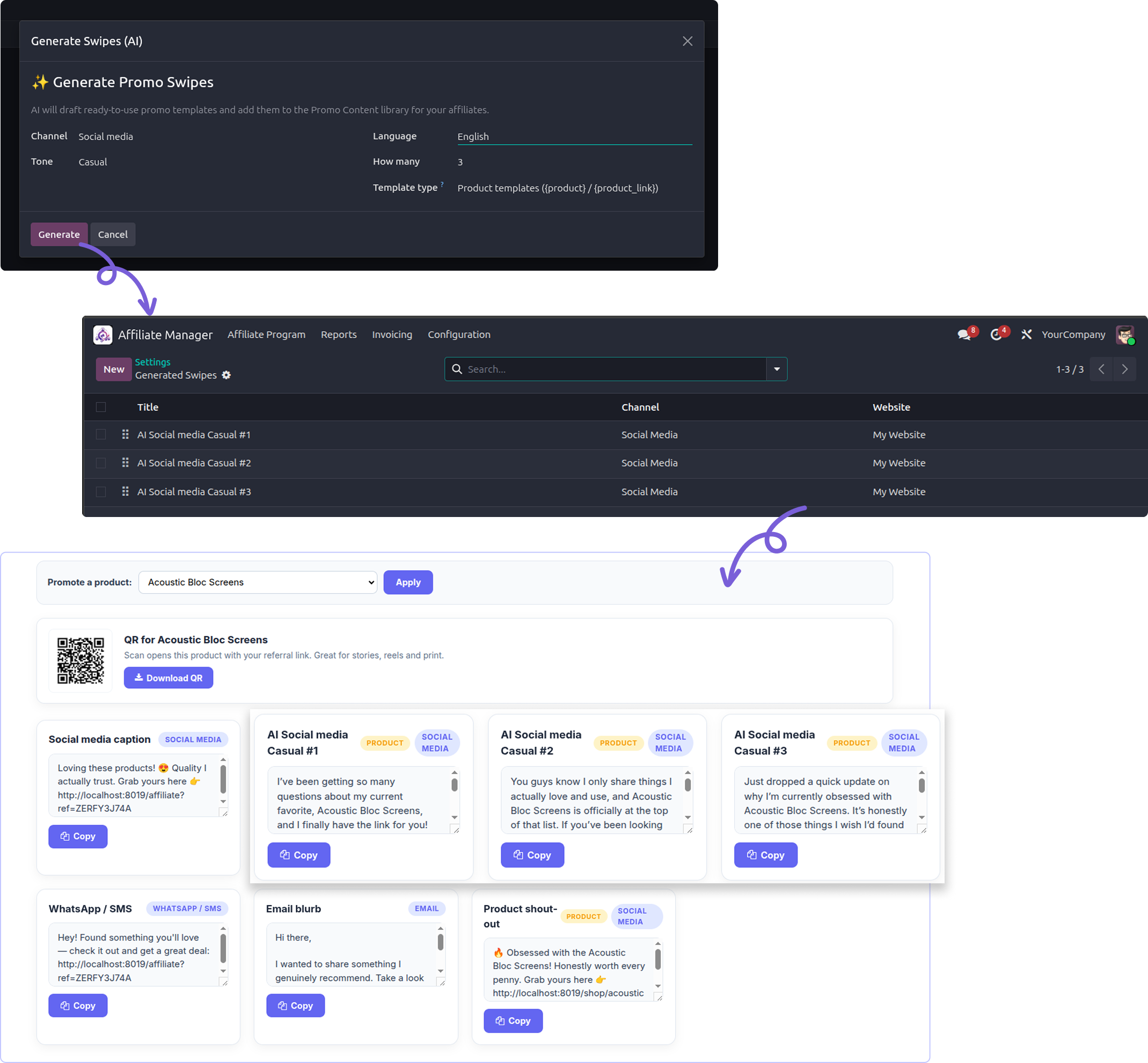
Menu: Affiliate -> Configuration -> Generate Swipes (AI).
Pick a channel, a tone, a language and how many you want. Click Generate. The AI writes that many promo templates
and saves them in your Promo Content library. All your affiliates can then use them.
Two template types :-
- Product templates - use {product} and {product_link}. One template works for any product.
- Generic - user {link}, the affiliate's home referral link.
After it runs, Odoo opens the list of new records. You can edit or delete them before affiliates see them.

AI program assistant
Open Affiliate Analysis. Click the cog (Actions) menu. Choose AI Program Insights.
Button 1 - Full Program Insights
You get KPI cards: total affiliates, sales, clicks, conversion rate, pending commission and paid commission. Below them,
tables of your top affiliates and top products. Then the AI writes a short analysis with 2-3 things you should do next.
The numbers are real
The cards and tables come straight from your database. Only the text below them is written by AI.
Button 2 - Ask
Type a question in plain English and click Ask. Lists and rankings come back as a clean table.
Examples :
- "Show me the top 5 affiliates by sales."
- "List all inactive affiliates."
- "Which products convert best?"
- "Who has a custom commission rate?"
- "How much commission is still pending?"

AI usage log
Menu: Affiliate -> Reporting -> AI Generations.
Every AI request creates one line here. Success or failure, affiliate or admin. Nothing is hidden.
- Date - When it ran. Newest first.
- Affiliate - Who asked. Empty for program-wide admin requests.
- Channel / Tone / Language - What was asked for.
- Product - The product being promoted, if any.
- AI Model - Which model answered.
- Prompt / Completion / Total Tokens - The exact token cost. The list adds up the total.
- Metered - Yes if it used the affiliate's balance.
- Status - Success or Error. Errors keep the reason.
- Prompt & Generated Content - The full text sent and received. Open the record to see it.
Tip
Group the list by Affiliate. The Total Tokens sum shows you who is spending the most.

Token control
AI costs money. So each affiliate has a token balance.
- Set a default grant. New approved affiliates get it automatically.
- Give one affiliate unlimited use with a single tick.
- Or turn off metering for everyone with one switch.
- Top up any balance by typing a new number.
- Admin AI tools never use anyone's tokens.

Works with any AI provider
You bring your own AI account. Pick your provider and the API URL fills in by itself.
- OpenAI - gpt-4o-mini
- Google Gemini - gemini-2.0-flash
- Anthropic Claude - claude-haiku-4-5
- OpenRouter - openai/gpt-4o-mini
- Custom - Any OpenAI-compatible URL, including your own server.
Each provider keeps its own API key. So you can switch providers and switch back without typing keys again.


What data the AI sees
The app never sends your whole database. Each action sends only what it needs.
- Generate / AI caption - Product name, short product description, the referral link, and the affiliate's brief.
- Improve / Translate - Only the text the affiliate pasted.
-
Ask AI / AI Coach - That one affiliate's own data: currency, referral link, commission plan and rates, tier ladder, sales,
clicks, earnings, top products, last sale, team totals, payout rules and commission rules. - Affiliate summary - The same data, for the affiliate you selected.
- Program insights / Admin ask - Program totals, plus a list of up to 60 affiliates with their group, rate, sales, clicks, commission, status and referrer. Also top products, the program plan, tiers and groups.
Please check this
Affiliate names and numbers are sent to your AI provider when you use the admin reports. Check your provider's
data policy first. No customer names, emails, addresses or payment details are ever sent.

Security

Two switches must be on: the global one and the affiliate's own one.
Turning off the master switch stops AI for everyone at once.
Admin AI tools check the Affiliate Manager group first. A portal user cannot reach them, even by calling the server directly.
An affiliate can only ever see their own data. There is no way to ask about someone else.
The portal endpoint checks access again on every request, not just when the page loads.
API keys are stored per provider and shown hidden.
Affiliate users can read the log. Only managers can change or delete it.
Error details are kept in the server log. Users only see a simple "please try again" message.

Need Help ?
You can instantly find the answer you need here when
you're looking for a quick solution.

No. Any OpenAI-compatible service works. Gemini, Claude and OpenRouter are ready to pick. "Custom" accepts your own URL.
No. You use your own AI account and pay that provider. The token balances here are just a limit you set on top.
Yes, any time. Each provider keeps its own key, so nothing is lost.
The AI panels disappear and new requests stop. Old content, templates and logs stay safe.
No. Tokens are only taken after a good answer.
No. The AI only reads the logged-in affiliate's own record.
Yes. They are normal Promo Content records. Edit, rename or delete them.
The KPI cards and tables are real database numbers, so they are always correct. The text below is the AI's opinion. Treat it as a suggestion.
No. You only need an API key. Everything else is done from the Settings page.
Yes, I do provide free support for 90 days for any queries or any bug/issue fixing.
In case of if any bug raised in the listed features of this module, I am committed to providing support free of cost. You will need to provide me server ssh access or database access in order to solve the issue.
Just drop us an email at info@terabits.xyz with your questions and doubts, we will reach out to you as soon as possible.
Changelog(s)
Each update brings improvements to make the
app work better for you.

Recommended Apps

Need any help for this module?
Contact us info@terabits.xyz for your queries



Advance Affiliate Manager with AI
An AI writer for your affiliates. They get ready-to-post captions, emails and
WhatsApp messages in one click. You get AI reports on your program. Works
with OpenAI, Gemini, Claude and OpenRouter.


What This App Does

Most affiliates stop promoting because writing is hard. This app writes for them.
It adds AI to your existing Affiliate Management module. Your affiliates open their portal and click one
button. The AI writes a post, an email or a whatsApp message. Their referral link is already inside.
They copy it and share it.
You stay in control. You choose the AI provider. You decide who can use it. You set how many tokens
each affiliate gets. Every request is saved in a log.
You also get AI tools for yourself. Ask questions about your program in plain English. Get a performance
summary for any affiliate. Create promo templates in bulk.


Key Highlights

Affiliates write posts in seconds, not hours.
Content is based on your real products, not generic
text.
Works with OpenAI, Google Gemini, Anthropic Claude,
OpenRouter or your own AI server.
Token limits stop surprise bills.
Admin AI tools are free. They never use affiliate
tokens.

The referral link is added automatically. No copy-paste
mistakes.
The AI answers questions using each affiliate's own
numbers.
You approve each affiliate one by one. Nobody
gets access by default.
Every AI request is logged with its token cost.
No coding needed. Everything is set from the
Settings page.

Writes content
Captions, emails, WhatsApp
messages, blog text and hashtags.

Answers questions
Affiliates ask. The AI replies using
their real data.

You control it
Master switch, per-affiliate
approval and token limits.

Reports for you
Program analysis and per-affiliate
summaries.


All Features

AI studio
A new AI panel on the affiliate's Promo Content page. It has four tabs.
- Generate - write new content.
- Improve - make their own text better.
- Translate - change the language.
- Ask AI - ask a question.
A badge at the top shows tokens left and tokens used. It updates after each request. If the affiliate has unlimited
use, it just says "Unlimited".

Generate content
The affiliate picks a few options and clicks Run. The AI writes three different versions.
- Channel - Social media · WhatsApp / SMS · Email · Blog / review
- Tone - Casual / Professional / Funny / Urgent (FOMO)
- Language - Any language. English by default.
- Product - One of your products, or a generic store link.
- Brief - Optional. Example: "for students" or "for gym users".
A badge at the top shows tokens left and tokens used. It updates after each request. If the affiliate has unlimited
use, it just says "Unlimited".

If a product is picked, the link goes to that product page with the affiliate's ref code.
If no product is picked, the link goes to the affiliate landing page with the ref code.
The text is plain. No stars, no markdown. It pastes cleanly into Instagram or WhatsApp.
Each result has a copy button.

Improve text
The affiliate pastes their own draft. The AI makes it shorter, clearer and more convincing.
They can also add an instruction like "make it shorter" or "make it more urgent". Links and hashtags are kept as they are.

Translate Text
The affiliate pastes text and types a language. The AI translates it.
It is not a word-by-word translation. The AI keeps the marketing tone natural. Links, hashtags and emojis stay the same.

Ask AI
The affiliate types any question. The AI answers using their real numbers.
It knows their commission plan, tier, earnings, top products, last sale and payout rules. So the answer is about
them, not general advice.
If the answer is not in the data, the AI says so. It does not make things up.

AI coach on the dashboard
A small "Ask AI Coach" box is added to the affiliate dashboard. It sits right under the welcome message.
The affiliate types a question and clicks Ask. The answer appears below. The tokens left are shown too.
Common questions :
- "What is my commission rate?"
- "How do I reach the next tier?"
- "Which product should I promote?"
- "When do I get paid?"


One-click AI caption
On the product link page, every product gets an AI caption button.
One click writes a social caption for that product. The product referral link is inside. A Copy button appears next to it.
This is the fastest way to go from "I found a product" to "I posted about it".

AI section on the landing page
A new section is added to your public affiliate landing page. It shows what the AI can do: social captions, smart
hashtags, email and WhatsApp copy, product pitches and the AI Coach.
This helps you recruit new affiliates. It is shown to everyone, even visitors who are not logged in.

AI summary of an affiliate
Open any affiliate and click generate AI summary.
You get 2 - 3 sentences. The AI tells you if this affiliate is a top performer, steady, or going quiet. Then it gives one
clear suggestion, like a tier bump, a bonus, or a re-engagement message.
The summary is saved on the record. Click again to refresh it.

Bulk promo templates
Menu: Affiliate -> Configuration -> Generate Swipes (AI).
Pick a channel, a tone, a language and how many you want. Click Generate. The AI writes that many promo templates
and saves them in your Promo Content library. All your affiliates can then use them.
Two template types :-
- Product templates - use {product} and {product_link}. One template works for any product.
- Generic - user {link}, the affiliate's home referral link.
After it runs, Odoo opens the list of new records. You can edit or delete them before affiliates see them.

AI program assistant
Open Affiliate Analysis. Click the cog (Actions) menu. Choose AI Program Insights.
Button 1 - Full Program Insights
You get KPI cards: total affiliates, sales, clicks, conversion rate, pending commission and paid commission. Below them,
tables of your top affiliates and top products. Then the AI writes a short analysis with 2-3 things you should do next.
The numbers are real
The cards and tables come straight from your database. Only the text below them is written by AI.
Button 2 - Ask
Type a question in plain English and click Ask. Lists and rankings come back as a clean table.
Examples :
- "Show me the top 5 affiliates by sales."
- "List all inactive affiliates."
- "Which products convert best?"
- "Who has a custom commission rate?"
- "How much commission is still pending?"

AI usage log
Menu: Affiliate -> Reporting -> AI Generations.
Every AI request creates one line here. Success or failure, affiliate or admin. Nothing is hidden.
- Date - When it ran. Newest first.
- Affiliate - Who asked. Empty for program-wide admin requests.
- Channel / Tone / Language - What was asked for.
- Product - The product being promoted, if any.
- AI Model - Which model answered.
- Prompt / Completion / Total Tokens - The exact token cost. The list adds up the total.
- Metered - Yes if it used the affiliate's balance.
- Status - Success or Error. Errors keep the reason.
- Prompt & Generated Content - The full text sent and received. Open the record to see it.
Tip
Group the list by Affiliate. The Total Tokens sum shows you who is spending the most.

Token control
AI costs money. So each affiliate has a token balance.
- Set a default grant. New approved affiliates get it automatically.
- Give one affiliate unlimited use with a single tick.
- Or turn off metering for everyone with one switch.
- Top up any balance by typing a new number.
- Admin AI tools never use anyone's tokens.

Works with any AI provider
You bring your own AI account. Pick your provider and the API URL fills in by itself.
- OpenAI - gpt-4o-mini
- Google Gemini - gemini-2.0-flash
- Anthropic Claude - claude-haiku-4-5
- OpenRouter - openai/gpt-4o-mini
- Custom - Any OpenAI-compatible URL, including your own server.
Each provider keeps its own API key. So you can switch providers and switch back without typing keys again.


What data the AI sees
The app never sends your whole database. Each action sends only what it needs.
- Generate / AI caption - Product name, short product description, the referral link, and the affiliate's brief.
- Improve / Translate - Only the text the affiliate pasted.
-
Ask AI / AI Coach - That one affiliate's own data: currency, referral link, commission plan and rates, tier ladder, sales,
clicks, earnings, top products, last sale, team totals, payout rules and commission rules. - Affiliate summary - The same data, for the affiliate you selected.
- Program insights / Admin ask - Program totals, plus a list of up to 60 affiliates with their group, rate, sales, clicks, commission, status and referrer. Also top products, the program plan, tiers and groups.
Please check this
Affiliate names and numbers are sent to your AI provider when you use the admin reports. Check your provider's
data policy first. No customer names, emails, addresses or payment details are ever sent.

Security

Two switches must be on: the global one and the affiliate's own one.
Turning off the master switch stops AI for everyone at once.
Admin AI tools check the Affiliate Manager group first. A portal user cannot reach them, even by calling the server directly.
An affiliate can only ever see their own data. There is no way to ask about someone else.
The portal endpoint checks access again on every request, not just when the page loads.
API keys are stored per provider and shown hidden.
Affiliate users can read the log. Only managers can change or delete it.
Error details are kept in the server log. Users only see a simple "please try again" message.

Need Help ?
You can instantly find the answer you need here when
you're looking for a quick solution.

No. Any OpenAI-compatible service works. Gemini, Claude and OpenRouter are ready to pick. "Custom" accepts your own URL.
No. You use your own AI account and pay that provider. The token balances here are just a limit you set on top.
Yes, any time. Each provider keeps its own key, so nothing is lost.
The AI panels disappear and new requests stop. Old content, templates and logs stay safe.
No. Tokens are only taken after a good answer.
No. The AI only reads the logged-in affiliate's own record.
Yes. They are normal Promo Content records. Edit, rename or delete them.
The KPI cards and tables are real database numbers, so they are always correct. The text below is the AI's opinion. Treat it as a suggestion.
No. You only need an API key. Everything else is done from the Settings page.
Yes, I do provide free support for 90 days for any queries or any bug/issue fixing.
In case of if any bug raised in the listed features of this module, I am committed to providing support free of cost. You will need to provide me server ssh access or database access in order to solve the issue.
Just drop us an email at info@terabits.xyz with your questions and doubts, we will reach out to you as soon as possible.
Changelog(s)
Each update brings improvements to make the
app work better for you.

Recommended Apps

Need any help for this module?
Contact us info@terabits.xyz for your queries



Advance Affiliate Manager with AI
An AI writer for your affiliates. They get ready-to-post captions, emails and
WhatsApp messages in one click. You get AI reports on your program. Works
with OpenAI, Gemini, Claude and OpenRouter.


What This App Does

Most affiliates stop promoting because writing is hard. This app writes for them.
It adds AI to your existing Affiliate Management module. Your affiliates open their portal and click one
button. The AI writes a post, an email or a whatsApp message. Their referral link is already inside.
They copy it and share it.
You stay in control. You choose the AI provider. You decide who can use it. You set how many tokens
each affiliate gets. Every request is saved in a log.
You also get AI tools for yourself. Ask questions about your program in plain English. Get a performance
summary for any affiliate. Create promo templates in bulk.


Key Highlights

Affiliates write posts in seconds, not hours.
Content is based on your real products, not generic
text.
Works with OpenAI, Google Gemini, Anthropic Claude,
OpenRouter or your own AI server.
Token limits stop surprise bills.
Admin AI tools are free. They never use affiliate
tokens.

The referral link is added automatically. No copy-paste
mistakes.
The AI answers questions using each affiliate's own
numbers.
You approve each affiliate one by one. Nobody
gets access by default.
Every AI request is logged with its token cost.
No coding needed. Everything is set from the
Settings page.

Writes content
Captions, emails, WhatsApp
messages, blog text and hashtags.

Answers questions
Affiliates ask. The AI replies using
their real data.

You control it
Master switch, per-affiliate
approval and token limits.

Reports for you
Program analysis and per-affiliate
summaries.


All Features

AI studio
A new AI panel on the affiliate's Promo Content page. It has four tabs.
- Generate - write new content.
- Improve - make their own text better.
- Translate - change the language.
- Ask AI - ask a question.
A badge at the top shows tokens left and tokens used. It updates after each request. If the affiliate has unlimited
use, it just says "Unlimited".

Generate content
The affiliate picks a few options and clicks Run. The AI writes three different versions.
- Channel - Social media · WhatsApp / SMS · Email · Blog / review
- Tone - Casual / Professional / Funny / Urgent (FOMO)
- Language - Any language. English by default.
- Product - One of your products, or a generic store link.
- Brief - Optional. Example: "for students" or "for gym users".
A badge at the top shows tokens left and tokens used. It updates after each request. If the affiliate has unlimited
use, it just says "Unlimited".

If a product is picked, the link goes to that product page with the affiliate's ref code.
If no product is picked, the link goes to the affiliate landing page with the ref code.
The text is plain. No stars, no markdown. It pastes cleanly into Instagram or WhatsApp.
Each result has a copy button.

Improve text
The affiliate pastes their own draft. The AI makes it shorter, clearer and more convincing.
They can also add an instruction like "make it shorter" or "make it more urgent". Links and hashtags are kept as they are.

Translate Text
The affiliate pastes text and types a language. The AI translates it.
It is not a word-by-word translation. The AI keeps the marketing tone natural. Links, hashtags and emojis stay the same.

Ask AI
The affiliate types any question. The AI answers using their real numbers.
It knows their commission plan, tier, earnings, top products, last sale and payout rules. So the answer is about
them, not general advice.
If the answer is not in the data, the AI says so. It does not make things up.

AI coach on the dashboard
A small "Ask AI Coach" box is added to the affiliate dashboard. It sits right under the welcome message.
The affiliate types a question and clicks Ask. The answer appears below. The tokens left are shown too.
Common questions :
- "What is my commission rate?"
- "How do I reach the next tier?"
- "Which product should I promote?"
- "When do I get paid?"


One-click AI caption
On the product link page, every product gets an AI caption button.
One click writes a social caption for that product. The product referral link is inside. A Copy button appears next to it.
This is the fastest way to go from "I found a product" to "I posted about it".

AI section on the landing page
A new section is added to your public affiliate landing page. It shows what the AI can do: social captions, smart
hashtags, email and WhatsApp copy, product pitches and the AI Coach.
This helps you recruit new affiliates. It is shown to everyone, even visitors who are not logged in.

AI summary of an affiliate
Open any affiliate and click generate AI summary.
You get 2 - 3 sentences. The AI tells you if this affiliate is a top performer, steady, or going quiet. Then it gives one
clear suggestion, like a tier bump, a bonus, or a re-engagement message.
The summary is saved on the record. Click again to refresh it.

Bulk promo templates
Menu: Affiliate -> Configuration -> Generate Swipes (AI).
Pick a channel, a tone, a language and how many you want. Click Generate. The AI writes that many promo templates
and saves them in your Promo Content library. All your affiliates can then use them.
Two template types :-
- Product templates - use {product} and {product_link}. One template works for any product.
- Generic - user {link}, the affiliate's home referral link.
After it runs, Odoo opens the list of new records. You can edit or delete them before affiliates see them.

AI program assistant
Open Affiliate Analysis. Click the cog (Actions) menu. Choose AI Program Insights.
Button 1 - Full Program Insights
You get KPI cards: total affiliates, sales, clicks, conversion rate, pending commission and paid commission. Below them,
tables of your top affiliates and top products. Then the AI writes a short analysis with 2-3 things you should do next.
The numbers are real
The cards and tables come straight from your database. Only the text below them is written by AI.
Button 2 - Ask
Type a question in plain English and click Ask. Lists and rankings come back as a clean table.
Examples :
- "Show me the top 5 affiliates by sales."
- "List all inactive affiliates."
- "Which products convert best?"
- "Who has a custom commission rate?"
- "How much commission is still pending?"

AI usage log
Menu: Affiliate -> Reporting -> AI Generations.
Every AI request creates one line here. Success or failure, affiliate or admin. Nothing is hidden.
- Date - When it ran. Newest first.
- Affiliate - Who asked. Empty for program-wide admin requests.
- Channel / Tone / Language - What was asked for.
- Product - The product being promoted, if any.
- AI Model - Which model answered.
- Prompt / Completion / Total Tokens - The exact token cost. The list adds up the total.
- Metered - Yes if it used the affiliate's balance.
- Status - Success or Error. Errors keep the reason.
- Prompt & Generated Content - The full text sent and received. Open the record to see it.
Tip
Group the list by Affiliate. The Total Tokens sum shows you who is spending the most.

Token control
AI costs money. So each affiliate has a token balance.
- Set a default grant. New approved affiliates get it automatically.
- Give one affiliate unlimited use with a single tick.
- Or turn off metering for everyone with one switch.
- Top up any balance by typing a new number.
- Admin AI tools never use anyone's tokens.

Works with any AI provider
You bring your own AI account. Pick your provider and the API URL fills in by itself.
- OpenAI - gpt-4o-mini
- Google Gemini - gemini-2.0-flash
- Anthropic Claude - claude-haiku-4-5
- OpenRouter - openai/gpt-4o-mini
- Custom - Any OpenAI-compatible URL, including your own server.
Each provider keeps its own API key. So you can switch providers and switch back without typing keys again.


What data the AI sees
The app never sends your whole database. Each action sends only what it needs.
- Generate / AI caption - Product name, short product description, the referral link, and the affiliate's brief.
- Improve / Translate - Only the text the affiliate pasted.
-
Ask AI / AI Coach - That one affiliate's own data: currency, referral link, commission plan and rates, tier ladder, sales,
clicks, earnings, top products, last sale, team totals, payout rules and commission rules. - Affiliate summary - The same data, for the affiliate you selected.
- Program insights / Admin ask - Program totals, plus a list of up to 60 affiliates with their group, rate, sales, clicks, commission, status and referrer. Also top products, the program plan, tiers and groups.
Please check this
Affiliate names and numbers are sent to your AI provider when you use the admin reports. Check your provider's
data policy first. No customer names, emails, addresses or payment details are ever sent.

Security

Two switches must be on: the global one and the affiliate's own one.
Turning off the master switch stops AI for everyone at once.
Admin AI tools check the Affiliate Manager group first. A portal user cannot reach them, even by calling the server directly.
An affiliate can only ever see their own data. There is no way to ask about someone else.
The portal endpoint checks access again on every request, not just when the page loads.
API keys are stored per provider and shown hidden.
Affiliate users can read the log. Only managers can change or delete it.
Error details are kept in the server log. Users only see a simple "please try again" message.

Need Help ?
You can instantly find the answer you need here when
you're looking for a quick solution.

No. Any OpenAI-compatible service works. Gemini, Claude and OpenRouter are ready to pick. "Custom" accepts your own URL.
No. You use your own AI account and pay that provider. The token balances here are just a limit you set on top.
Yes, any time. Each provider keeps its own key, so nothing is lost.
The AI panels disappear and new requests stop. Old content, templates and logs stay safe.
No. Tokens are only taken after a good answer.
No. The AI only reads the logged-in affiliate's own record.
Yes. They are normal Promo Content records. Edit, rename or delete them.
The KPI cards and tables are real database numbers, so they are always correct. The text below is the AI's opinion. Treat it as a suggestion.
No. You only need an API key. Everything else is done from the Settings page.
Yes, I do provide free support for 90 days for any queries or any bug/issue fixing.
In case of if any bug raised in the listed features of this module, I am committed to providing support free of cost. You will need to provide me server ssh access or database access in order to solve the issue.
Just drop us an email at info@terabits.xyz with your questions and doubts, we will reach out to you as soon as possible.
Changelog(s)
Each update brings improvements to make the
app work better for you.

Recommended Apps